


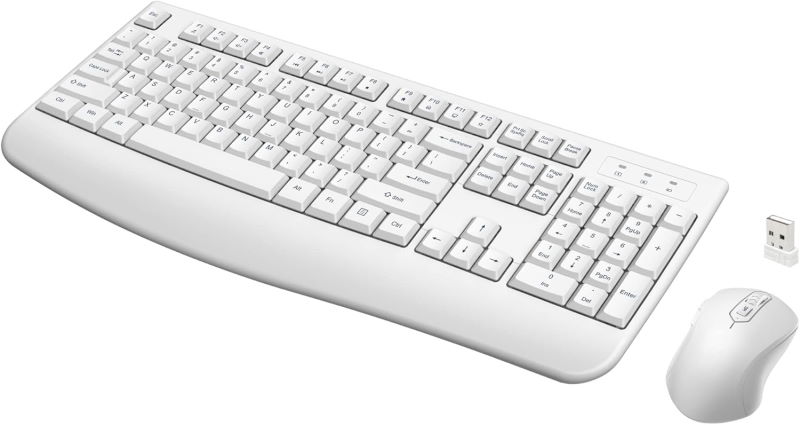
Quasio Wireless Keyboard and Mouse Combo (White)
The Quasio Wireless Keyboard and Mouse Combo delivers a clean, clutter-free desktop experience with its sleek white design and reliable wireless connectivity. Engineered for everyday productivity, this combo is perfect for home offices, students, and professionals who value simplicity and efficiency.
Key Features
- True Wireless Freedom: Enjoy a reliable 2.4GHz wireless connection with a range of up to 10 meters, ensuring responsive input without tangled cables.
- Adjustable DPI Mouse: The included mouse offers adjustable DPI settings (typically 800/1200/1600) to match your precision needs, whether you're browsing or working on detailed tasks.
- Power Saver Technology: Both keyboard and mouse are designed with energy efficiency in mind, featuring auto-sleep modes to extend battery life. The mouse also includes an on/off switch for extra conservation.
- Comfortable and Quiet: Low-profile keys and a contoured mouse provide a comfortable typing and navigation experience, while quiet switches minimize noise in shared spaces.
- Plug-and-Play Setup: Simply insert the included USB receiver and start working – no software installation required.
Performance and Use Cases
This combo is ideal for everyday tasks such as word processing, email, web browsing, and spreadsheet management. The adjustable DPI mouse enhances accuracy for photo editing or detailed design work, while the wireless design keeps your desk tidy. The power-saving features make it a great choice for users who want to minimize battery replacements.
Who Is It For?
Whether you're setting up a home office, outfitting a student desk, or replacing an aging wired set, the Quasio Wireless Keyboard and Mouse Combo offers a practical, budget-friendly solution. Its white aesthetic blends well with modern workspaces and Apple-style setups.
Please note: This combo is not designed for gaming – it lacks gaming-specific features like programmable keys and high polling rates. It is best suited for productivity and general use.
Key Specifications
Pros
- Reliable 2.4GHz wireless connection with 10m range
- Adjustable DPI mouse (800/1200/1600) for versatile use
- Power-saving auto-sleep and on/off switch extend battery life
- Plug-and-play setup u2013 no software needed
- Quiet, comfortable keys and mouse for daily productivity
Cons
- Not suitable for gaming due to lack of gaming features
- White color may show dirt and stains over time
- No backlighting, limiting use in low-light conditions