


Two RTX 5090s in one case is the kind of build that makes your electric company send you a thank-you card (no pun intended). However, before you go down that route, you need a straight answer on the cost of a dual RTX 5090 PC build, because this isn’t a “check the sale on Amazon and call it a day” kind of purchase. It’s the kind of rig where the parts list alone could buy a decent used car, and we’re going to walk through exactly why.
This guide breaks down what a dual RTX 5090 setup actually costs in 2026, what hardware you need to keep two flagship GPUs fed and cool, and which components make sense on both the AMD and Intel side. We’ll also flag a handful of RTX 5090 variants worth your attention, since not every “5090” on the shelf behaves the same way once you cram two of them into a single chassis.
About Dual RTX 5090 Builds
Let’s clear something up first: a dual RTX 5090 build should not be a gaming build ideally (though I know some hardcore gamers just want to spend that dough on an expensive rig for bragging purposes). Multi-GPU rendering for games effectively died with the fall of SLI and Crossfire, and modern game engines rarely split rendering work across two cards. So if the goal was doubling your frame rate in the latest shooter, that dream ended a few GPU generations ago.
What dual RTX 5090 setups are genuinely good for is compute (where GPUs do the hard number crunching for intensive processing like AI video generation, AI audio generation, content generation, etc.). Think large language model training, Blender and Octane rendering, video encoding pipelines, and scientific workloads that can split tasks across multiple GPUs through CUDA. If that’s your use case, our guide on RTX 5090 PC build cost for LLM workloads goes deeper into VRAM pooling and model sizing.

If you’re mainly chasing gaming performance and only considering a second card out of curiosity, a single RTX 5090 setup will serve you far better for the money. Our breakdown of the ultimate gaming PC build with RTX 5090 covers that scenario in detail.
Cost of a Dual RTX 5090 PC Build: What to Expect
Here’s the number you actually clicked for: as of 2026, a single RTX 5090 runs anywhere from roughly $5,500 at MSRP to $6,000 or more for premium AIB variants, depending on cooler design and factory overclock. Multiply that by two, and the GPUs alone will eat somewhere between $11,000 of your budget before you’ve bought a single other part.
Add the rest of the platform, and the full cost of a dual RTX 5090 PC build lands somewhere between $15,500 for either the AMD or Intel configuration above. CPU and motherboard pricing runs close between the two platforms, so the GPU choice ends up being the biggest swing factor in your final total.
For a full pricing walkthrough with alternate tiers and part substitutions, our guide on the cost of a PC build with RTX 5090 is worth a read before you check out.
Popular RTX 5090 Models Worth Considering
Not every RTX 5090 handles dual-GPU duty equally well, so here are five variants worth knowing about.

ASUS ROG Astral GeForce RTX 5090 White OC Edition
Launched at an MSRP of $2,799.99, but Amazon and other US retailers have priced it anywhere from roughly $5,000 to over $6,000 depending on stock, with an average closer to $5,600. The card remains the reference point for custom RTX 5090s: quad-fan cooling, a reinforced die-cast frame, and a small OLED panel on the shroud for temperature or logo display. Power delivery is the strongest in ASUS’s lineup, built to sustain aggressive overclocks. The tradeoff is size; at 3.8 slots and a considerable length, it will crowd or outright block a second card’s intake in most dual-GPU cases.
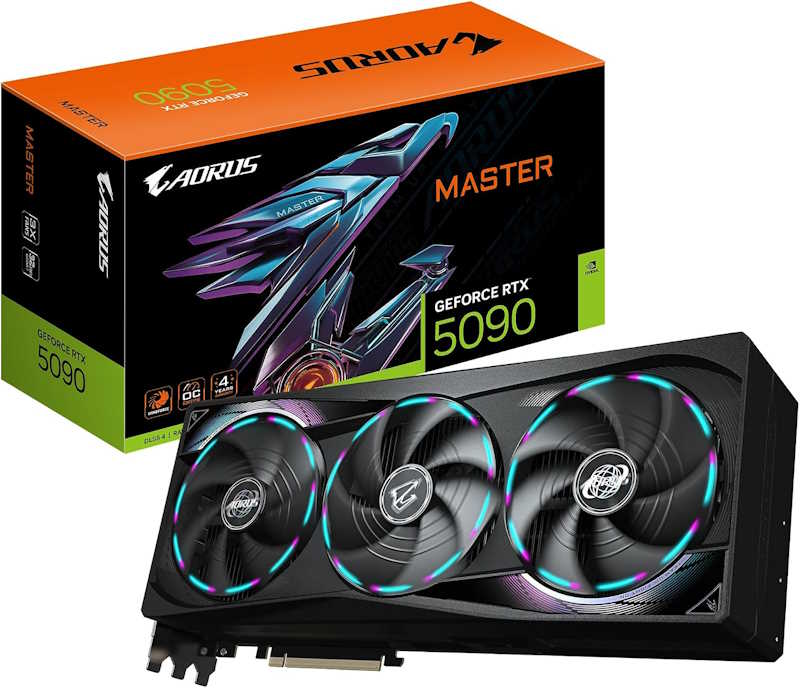
Gigabyte AORUS GeForce RTX 5090 Master 32GB
Retail listings put this card in the $5,000 to $6,000 range on Amazon, which is quite typical for a card of this caliber. The WINDFORCE cooling system uses alternating-spin fans and a large vapor chamber, giving it thermal headroom that suits sustained, hours-long overclocked workloads rather than short bursts. Power delivery is robust, if not quite at Astral tier. Its triple-fan, open-air design shares the same drawback as most air-cooled 5090s: heat gets dumped back into the case, which matters more once a second card sits directly beneath it, starved of fresh air intake.
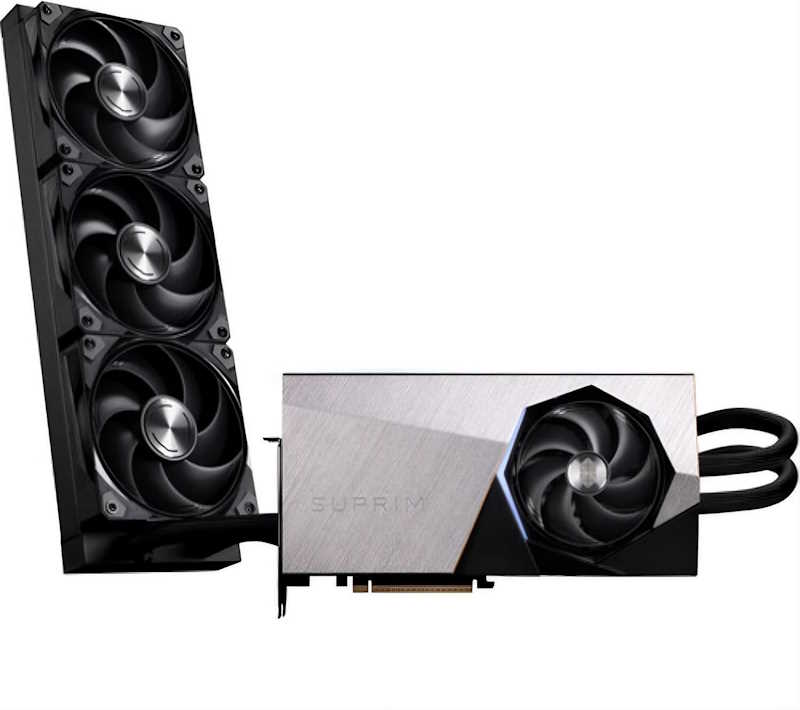
MSI RTX 5090 Suprim Liquid X 32GB
The Suprim Liquid X sits at the top of the price chain, compared to the rest (probably due to its aggressive cooling hardware). The 360mm AIO radiator moves the bulk of the GPU’s heat output away from the motherboard tray entirely, which is the single biggest advantage in a dual-card build; the second GPU’s intake fans pull cooler air instead of Astral or AORUS exhaust. The compromise is radiator placement, since a 360mm rad needs a case with room up top or in front, and liquid cooling introduces a pump and hoses as long-term failure points, however statistically rare.

PNY NVIDIA GeForce RTX 5090
PNY doesn’t currently sell a blower-cooled 5090. Every RTX 5090 SKU in its lineup, including the Epic-X ARGB OC, uses an open-air triple-fan cooler, running around the typical $5000+ price point on Amazon. The only blower-style 5090 on the US market right now comes from AFOX, sold near $5,999 as a dual-slot workstation card. If dual-card exhaust routing is the goal, that AFOX card – not PNY – is the actual option; PNY’s own triple-fan model behaves like any other open-air card in a stacked configuration.

Zotac GeForce RTX 5090 Amp Extreme
Amazon pricing runs roughly $5,000 to $5,500, positioning it just under the AORUS Master. Triple 100mm BladeLink fans and a vapor chamber 34% larger than the previous generation give it competent thermals for a factory-overclocked card, backed by dual BIOS for a quieter fallback profile. It won’t match Astral’s power delivery ceiling or Suprim Liquid’s thermal isolation, but for buyers who want factory overclock headroom without paying flagship prices, it sits in a reasonable middle spot on both cost and cooling.
AMD PC Build for a Dual RTX 5090 Setup
These components are hand-picked and vetted for compatibility, though we do not guarantee availability. They are tailored for an AMD-based dual RTX 5090 build meant for heavy AI training, 3D rendering, and other multi-GPU compute workloads rather than gaming alone. If you’d rather swap parts to fit your budget or workload, use the AI PC Builder tool. Simply click on the BUILD/CUSTOMIZE THIS button to get started.
- CPU: Ryzen 9 9950X3D$624.00
Price on Newegg
Amazon Price
- Motherboard: ASUS ROG Crosshair X870E Hero$539.95
- GPU: 2X PNY NVIDIA GeForce RTX 5090 (Unavailable)$12,399.90
- RAM: TEAMGROUP T-Force Delta RGB DDR5 64GB$999.99
- Storage 1: Crucial T705 PCIe Gen5 NVMe 2TB SSD$399.00
- PSU: be quiet! Dark Power Pro 13 1600W$399.99
- Case: Lian Li Dynamic EVO XL$254.99
- CPU Cooler: Thermalright Frozen Warframe 360 ARGB AIO$89.59
TOTAL COST: $15,707.41
📊 Price History
[Prices updated: 5:25pm, 10/27/2026]
Intel PC Build for a Dual RTX 5090 Setup
These components are hand-picked and vetted for compatibility, though we do not guarantee availability. They are tailored for an Intel-based dual RTX 5090 build suited to rendering farms, machine learning experiments, and content creation pipelines that benefit from a second GPU. If you’d rather swap parts to fit your budget or workload, use the AI PC Builder tool. Simply click on the BUILD/CUSTOMIZE THIS button to get started.
- CPU: Core Ultra 9 285K$509.99
- Motherboard: Gigabyte Z890 Aorus Master $328.42
- GPU: 2X msi NVIDIA GeForce RTX 5090 32G Ventus 3X OC (Unavailable)$10,599.98
- RAM: TEAMGROUP T-Force Delta RGB DDR5 64GB$999.99
- Storage 1: Crucial T705 PCIe Gen5 NVMe 2TB SSD$399.00
- PSU: be quiet! Dark Power Pro 13 1600W$399.99
- Case: Lian Li Dynamic EVO XL$254.99
- CPU Cooler: Thermalright Frozen Warframe 360 ARGB AIO$89.59
TOTAL COST: $13,581.95
📊 Price History
[Prices updated: 5:25pm, 10/27/2026]
Putting it Together
Assembling a dual GPU rig is a different beast from a standard build. Spacing, PCIe lane allocation, and cable management for a 1600W supply all require more planning than your average single-card setup.
If you’ve never built a PC before, don’t attempt to learn on a machine with two RTX 5090s in it. Start with our step-by-step guide to building your own PC to get comfortable with the fundamentals first.
Once you’re ready, mount both GPUs with at least one slot of clearance between them if your motherboard allows it, or use PCIe riser cables to physically separate the cards for better airflow. Route your 12VHPWR cables carefully, since kinking them near the connector is a common cause of melted connectors on high-wattage cards.
Optimizing Your Build for Dual RTX 5090 Performance
Two RTX 5090s pull a serious amount of power, so don’t skimp on your wall circuit. A dedicated 20-amp circuit is worth discussing with an electrician if you’re running this system for extended workloads.
- Set a power limit in software like MSI Afterburner to keep both cards a bit under their maximum draw during long training or render sessions.
- Use at least three intake fans and two exhaust fans in your case to maintain positive airflow around both GPUs.
- Update to the latest NVIDIA Studio or Game Ready drivers, since multi-GPU compute support improves with nearly every driver cycle.
- Monitor VRAM usage closely if you’re running LLMs, since workload distribution across two cards depends heavily on your framework’s configuration.
Conclusion
The cost of a dual RTX 5090 PC build sits comfortably north of $10,000 once you account for a platform capable of actually feeding two flagship GPUs. To be honest – it’s not a build for casual gaming bragging rights; it’s a build for people with real compute needs and the budget to match.
If that’s you, both the AMD and Intel configurations above will get the job done reliably. Ready to fine-tune your own parts list? Head over to the AI PC Builder tool and start customizing your dual RTX 5090 rig today.
All Articles