


If your timeline has ever been held hostage by a sluggish export queue, I’m sure you can relate. Choosing the best motherboard for 4K video editing is not glamorous work, but it is arguably the most consequential decision in your entire build. The CPU gets the glory, the GPU gets the screenshots, and the motherboard quietly determines whether all of it actually talks to each other at full speed, or limps along like a dial-up connection at a LAN party.
In 2026, 4K editing workflows have grown considerably more demanding. Multi-cam timelines, RAW footage, and real-time color grading are no longer edge cases; they are the baseline expectation for anyone doing serious work. The motherboard you pick will shape your PCIe bandwidth, RAM capacity, NVMe storage throughput, and Thunderbolt connectivity, all of which matter enormously when you are pushing 4K assets through DaVinci Resolve or Premiere Pro.
This guide covers seven of the best picks currently available, split across AMD and Intel platforms, with practical notes on what each board actually does well and where it falls short. Are you up for this? Let’s roll!
What Makes a Motherboard “Great” for 4K Video Editing?
Before diving into specific boards, it is worth being precise about what the workload actually demands. 4K editing is not gaming. The bottlenecks are different, and the priorities shift accordingly.
Here is what to focus on when evaluating a motherboard for editing work:
- PCIe 5.0 support: Essential for the fastest NVMe drives in 2026. Editing from slow storage is the single biggest workflow killer most people underestimate.
- RAM slots and capacity: 4K editing benefits enormously from 64GB or more. Look for boards with four DIMM slots and support for DDR5 at high speeds.
- Thunderbolt 4 or USB4: Critical for connecting external drives, capture cards, and docks without bottlenecking transfer rates.
- Multiple M.2 slots: You will want separate drives for your OS, project cache, and media storage. Three or more M.2 slots is the practical minimum.
- VRM quality: High-core-count CPUs used in editing workloads draw serious power. A board with weak voltage regulation will throttle performance under sustained load.
AMD Motherboards for 4K Video Editing
AMD’s Ryzen 9000 series and the Threadripper platform remain strong choices for content creation in 2026. The AM5 socket gives you a solid upgrade path, and the chipset options are mature enough that most of the early BIOS instability issues have been resolved.
You can actually build a solid editing rig taking all these into consideration by utilizing our AI PC Builder. It’s free, works great, and takes care of the technical aspects like compatibility. Simply click on the “Build with This” button to get started.
1. ASUS ProArt X870E-Creator WiFi

ASUS ProArt X870E Creator WiFi
Built from the ground up for creative professionals rather than gamers, this board’s I/O layout reflects actual editing workflows: fast wired networking, plentiful high-speed USB, and storage slots sized for a real multi-drive setup. The aesthetic is sober and workstation-appropriate. It does not push memory speeds as aggressively as its gaming-oriented siblings, though that gap rarely surfaces in editing workloads.
ASUS built this board specifically for creators, and it shows. The ProArt X870E carries four DDR5 slots supporting up to 256GB of RAM, five M.2 slots with PCIe 5.0 on the primary two, and dual Thunderbolt 4 ports on the rear panel. It is one of the cleaner implementations of the X870E chipset available right now.
The VRM configuration is robust enough to handle a Ryzen 9 9950X under sustained Resolve renders without throttling. The BIOS is well-organized, which matters more than people admit when you are tuning XMP profiles at 11pm before a client deadline.
2. MSI MEG X870E ACE Max

MSI MEG X870E Ace Max
Sits in a sensible position between MSI’s mid-range and halo-tier boards, offering nearly everything the Godlike provides at a substantially lower price. Five M.2 slots, strong networking, generous USB density, and one of the more refined BIOS implementations on the AM5 platform make it a well-rounded editing foundation. M.2 SSD temperatures run slightly warmer than some competitors at this price, though throttling under normal case airflow is unlikely.
Built on the AMD X870E chipset with support for Ryzen 7000, 8000, and 9000 series processors, the MEG X870E ACE Max arrives with an 18-phase 110A VRM that handles even the most demanding multi-core CPUs without thermal compromise — relevant for editors running sustained 4K exports alongside background renders. Five M.2 slots, two of them PCIe 5.0, provide enough fast storage to separate scratch, project, and archive drives without reaching for a SATA expansion card.
The 10GbE wired port addresses the single biggest bottleneck in collaborative editing environments: pulling raw 4K footage from a NAS at speeds that keep pace with the drive subsystem. Dual USB4 ports at 40Gbps support direct connection to high-speed external drives or a 4K reference monitor. Wi-Fi 7 and a premium ALC4082 audio codec with discrete DAC round out a board that requires little supplementing for a complete professional editing station.
3. Gigabyte X870E Aorus Master

Gigabyte X870E AORUS Master
Consistently strong performance in sustained encoding workloads, with effective thermal management on its fast storage slots, which is a practical concern during long export sessions. The build quality is solid throughout, and Gigabyte’s tool-free installation features make drive swaps straightforward. Editors who transfer large files from a 10-gigabit NAS will need to supplement the networking with an add-in card.
Gigabyte’s Aorus Master has historically offered strong value at the high-end, and the X870E version continues that pattern. It is slightly less expensive than the ASUS ProArt while offering comparable M.2 slot count and a similarly capable VRM section.
One genuine advantage here is the onboard 10GbE LAN, which is useful if your editing suite connects to a NAS for shared media storage. Thunderbolt 4 is present via a header rather than a native rear port, which is a minor inconvenience but not a dealbreaker for most setups.
Intel Motherboards for 4K Video Editing
Intel’s Core Ultra 200 series on the LGA1851 socket brought meaningful improvements to content creation performance in late 2025, and the Z890 chipset motherboards have had enough time to mature. If you are already invested in the Intel ecosystem or prefer the platform’s Thunderbolt implementation, there are strong options here.
4. ASUS ROG Maximus Z890 Apex
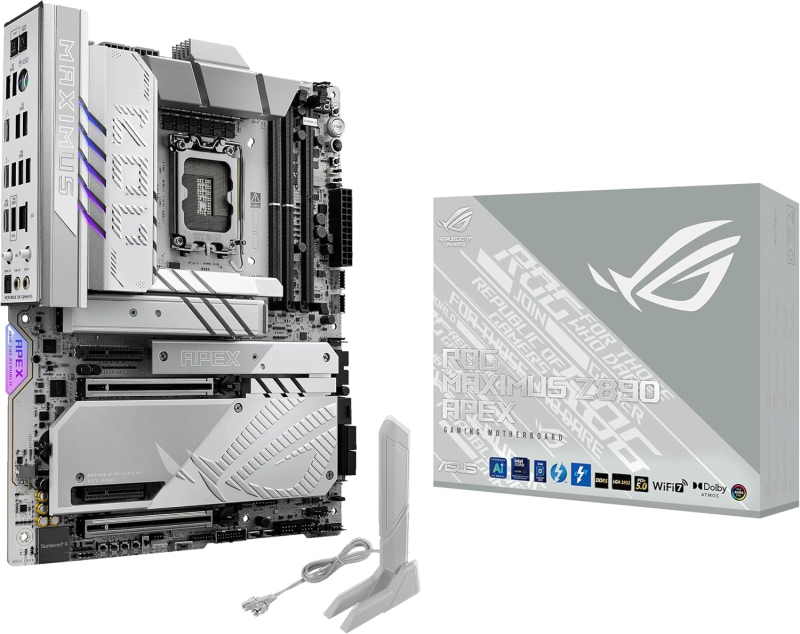
ASUS ROG Maximus Z890 Apex
Thunderbolt 4, exceptional power delivery, and broad storage capacity make this a genuinely capable editing platform, with the dual TB4 ports well-suited for high-bandwidth external drives and pro displays. The memory overclocking infrastructure is the finest available on Z890. It is, however, a board built around a CPU platform that has underdelivered in creative workloads relative to the competition, and the price reflects aspirations the underlying processor does not always meet.
The Maximus Apex is built for enthusiasts who refuse to leave performance on the table. It carries a 20-phase VRM, support for DDR5 at speeds beyond 9000MHz, and comprehensive PCIe 5.0 coverage across both the primary GPU slot and the top two M.2 slots.
For 4K editing specifically, the Apex’s memory overclocking headroom translates directly into faster frame buffer handling in DaVinci Resolve. It also includes dual Thunderbolt 4 ports natively, which is a feature that matters the moment you start connecting high-speed external media.
5. MSI MEG Z890 ACE

msi MEG Z890 ACE Gaming
The combination of 10GbE and dual Thunderbolt 4 is the headline for editors: fast NAS transfers and high-bandwidth external storage or displays coexist without contention. Power delivery is excessive for any realistic editing demand, which in practice means rock-solid stability under prolonged load. The Intel platform it supports, though well-served by this board, trails AMD’s current generation in sustained productivity throughput.
MSI’s Z890 ACE is the Intel counterpart to the X870E ACE, and it brings a similarly no-compromise approach to the LGA1851 platform. The board features a 24+1+1 phase VRM, four M.2 slots with PCIe 5.0 support, and onboard 10GbE networking.
It is particularly well-suited to workloads that stress memory bandwidth, which includes most modern 4K editing pipelines. The BIOS is among the more polished implementations MSI has shipped in recent years, with sensible defaults that do not require extensive manual tuning to get stable performance.
6. Gigabyte Z890 Aorus Elite AX Ice

GIGABYTE Z890 AORUS Elite WIFI7
The most approachable entry point into a capable Intel editing build, with Thunderbolt 4 and Gen 5 storage support at a price that leaves room in the budget for faster drives or more memory. The white design is genuinely clean. Wired networking and rear USB density are noticeably thinner than the boards above it, which will matter to any editor regularly pulling from network storage.
Not every editor needs the absolute flagship board, and the Aorus Elite AX Ice is the most sensible mid-range Intel option on this list. It still supports DDR5 at 8000MHz, includes three M.2 slots with PCIe 5.0 on the primary, and ships with WiFi 7 and 2.5GbE LAN as standard.
The VRM is rated for Core Ultra 9 chips without issue, and the overall build quality is consistent with what Gigabyte has been delivering on the Z890 platform. For someone stepping up from a previous-gen workstation without wanting to spend flagship money, this is a well-balanced entry point.
7. ASRock Z890 Taichi Aqua
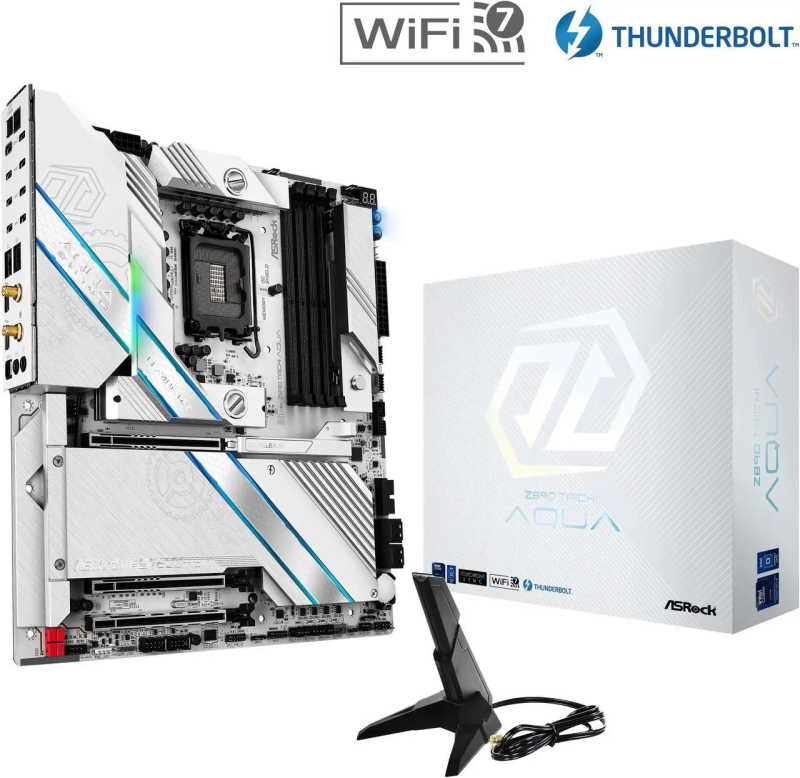
ASRock Z890 Taichi Aqua
Designed for custom-loop systems, with water blocks for both the VRM and primary storage slot ensuring thermal headroom that no air-cooled board can match under sustained workloads. The all-USB-C rear I/O and dual 10GbE networking reflect a considered vision of a modern editing station. That same all-Type-C philosophy requires adapters for any legacy peripheral, which may be a meaningful inconvenience depending on existing studio equipment.
ASRock does not always get the attention it deserves in enthusiast circles, but the Taichi Aqua is a genuinely compelling board for editors who run custom water cooling loops. The pre-installed water block on the VRM and chipset area is a practical feature, not just an aesthetic one, particularly if your editing workstation lives in a hot room or a compact case with limited airflow.
It includes Thunderbolt 4, four M.2 slots, and 10GbE LAN. The BIOS has improved significantly through firmware updates in early 2026, and compatibility with high-speed DDR5 kits is now reliable. It is one of the more distinctive options on this list, and worth considering if your build has a liquid cooling component already.
Putting it Together
Selecting the right board is only part of the equation. Once you have your components in hand, the assembly process matters just as much as the parts list. If you are building your first workstation or returning to PC building after a long break, working through a structured guide will save you a significant amount of frustration.
For a detailed walkthrough of the full assembly process, this step-by-step DIY PC build guide covers everything from mounting the CPU to first boot, in plain language without assuming prior experience.
A few practical notes specific to editing workstations:
- Install your NVMe drives before seating the GPU; access becomes awkward afterward on most ATX boards.
- Enable XMP or EXPO in the BIOS on first boot; most DDR5 kits ship at JEDEC speeds by default, which is well below their rated performance.
- If you are using Thunderbolt peripherals, verify that the port is enabled in BIOS; it is disabled by default on several boards for security reasons.
- Run a sustained CPU benchmark like Cinebench R24 multi-core for 10 minutes before loading editing software; this will surface any thermal throttling issues early.
Optimizing Your Build for 4K Video Editing
Hardware alone does not determine editing performance. The way the system is configured plays a meaningful role, particularly with memory and storage settings.
In DaVinci Resolve, setting the GPU processing mode to CUDA (NVIDIA) or OpenCL (AMD) explicitly, rather than leaving it on automatic, often produces more consistent render times. Resolve’s memory and GPU cache settings should also be pointed at your fastest NVMe drive, not the OS drive.
For Premiere Pro users, enabling hardware encoding through the export settings and ensuring that the GPU is listed under the renderer in project settings will reduce export times considerably. Adobe’s Mercury Playback Engine benefits directly from the GPU VRAM available, which is one reason the RTX 5080 and RX 9070 XT appear in the build lists above rather than mid-range alternatives.
On the storage side, keeping your media drive and your project cache on separate NVMe volumes is not optional at 4K; it is the difference between smooth playback and dropped frames on complex timelines. The dual-drive configurations in the build lists above reflect this directly.
Conclusion
The best motherboard for 4K video editing in 2026 depends on your platform preference, budget ceiling, and specific workflow demands. For AMD users, the ASUS ProArt X870E-Creator WiFi sits at the top of the list for its creator-focused feature set and clean implementation of the X870E chipset. On the Intel side, the ROG Maximus Z890 Apex is the stronger choice for users who want maximum memory bandwidth and native Thunderbolt 4 support.
Mid-range options like the Gigabyte Z890 Aorus Elite AX Ice and the Gigabyte X870E Aorus Master offer most of the functionality at a lower price point, and they are worth serious consideration if the flagship boards exceed your budget without offering features you will actually use.
Whatever you choose, prioritize PCIe 5.0 NVMe support, adequate M.2 slot count, and a VRM capable of sustaining your CPU under prolonged rendering loads. Get those three things right, and the rest of the build will follow logically.
All Articles