


Video Editing professionals must constantly update their hardware to meet the current demands of video editing software, that’s why you need to carefully choose components that are future-proof for at least 5 years. This guide attempts to answer this question: what is the best 4k video editing PC build list? We’ve selected the best components for you, taking the guesswork off your chest.
This guide is going to offer you 2 options, either an Intel-based 4K editing rig or an AMD-based editing PC. Whichever you are going to choose will give you satisfactory performance because we have vetted all the components to provide excellent bang-for-buck performance.
You might also want to check out our guide on how to build the best budget gaming PC. For content creators and 3D artists, you can head over to this page for our best 3D animation and render desktop build. You might also check out other guides for custom PC builds. Otherwise, if you are ready, let’s go!
This page contains affiliate links. We usually earn a small commission for qualifying purchases made through these links, at no extra cost to you. This is to support our work.
The best 4K Video Editing PC Build list
AMD 4K Video Editing PC Build
These components are hand-picked and vetted for compatibility, though we don’t guarantee availability. They are suitable for an AMD PC for 4K editing. If you don’t like the recommendations, you can easily swap out unwanted parts and add new ones using the AI PC Builder tool. Simply click on the BUILD/CUSTOMIZE THIS button to get started.

- CPU: Ryzen 9 9950X3D$639.99
Price on Newegg
Amazon Price
- Motherboard: MSI MAG X870 Tomahawk WiFi$223.23
- CPU Cooler: Arctic Liquid Freezer III Pro 360$92.99
- RAM: Klevv Cras V RGB DDR5 64GB$847.99
- GPU: Nvidia GeForce RTX 4080 Super$1,699.99
- Storage 1: WD_BLACK 2TB SN850P NVMe $299.99
- Storage 2: Lexar 8TB NM790 SSD PCIe Gen4 NVMe M.2$1,449.99
- PSU: NZXT C1000 ATX 1000 Watts 80+ Gold$134.99
- Case: CORSAIR 4000D RS Mid-Tower ATX Case White$99.99
TOTAL COST: $5,489.15
📊 Price History
[Prices updated: 5:02pm, 05/21/2026]
Intel 4K Video Editing PC Build
These components are hand-picked and vetted for compatibility, though we don’t guarantee availability. They are suitable for an Intel PC for 4K editing. If you don’t like the recommendations, you can easily swap out unwanted parts and add new ones using the AI PC Builder tool. Simply click on the BUILD/CUSTOMIZE THIS button to get started.
- CPU: Core Ultra 9 285K$544.99
- Motherboard: Asus ROG Maximus Z890 Hero$441.72
- CPU Cooler: Corsair iCUE Link Titan 360 RX$159.99
- RAM: Klevv Cras V RGB DDR5 64GB$847.99
- GPU: TUF Gaming GeForce RTX 5080 16G$1,604.00
- Storage 1: Western Digital WD_BLACK 2TB SN770$434.60
- Storage 2: Sabrent 8TB Rocket 4 Plus NVMe$2,399.99
- PSU: be quiet! Dark Power Pro 13 1000W$249.90
- Case: MUSETEX K2 ATX Mid Tower Computer Case$89.99
TOTAL COST: $6,773.17
📊 Price History
[Prices updated: 5:02pm, 05/21/2026]
Hardware priority chart for a 4K Video Editing PC build
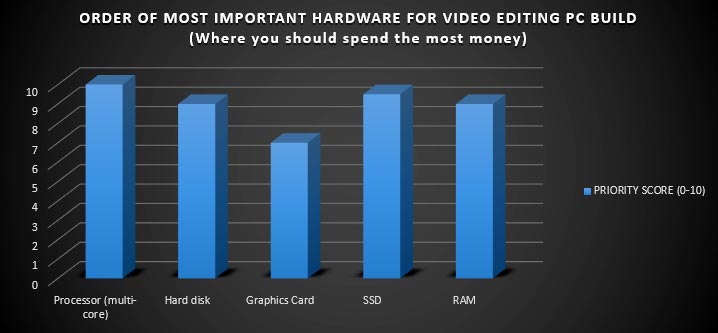
From the chart above, you should dedicate the most resources to getting the best multi-core processor your money can buy. This is because when it comes to video rendering, encoding, or transcoding, the more cores your processor has, the better.
This translates to faster processing times. The next in order of importance is a fast SSD drive for your video editing apps, large amounts of fast RAM, and a large capacity hard disk drive for data storage.
RELATED ARTICLE

Best Wi-Fi Routers for Gaming and Streaming
We round up the best of the best routers for gaming and streaming. Full Review and buying guide
What you need for this build
- Best 4K Video Editing PC build Components
- Anti-static wrist band
- Screwdriver
Main components for the best 4K Video Editing PC Build
The Processor
The processor must have at least 8 cores with multi-threading enabled. The 2 CPUs we cover in this guide are more than capable of 4K Video editing.
Motherboard
For the best 4K editing experience, the motherboard must have plenty of ports, preferably a thunderbolt port to enable high-speed footage transfers.
Graphics Card
The Nvidia RTX 3090 GPU is more than capable of 4K Video editing. This for now is Nvidia’s flagship product, and you can’t go wrong with this. You can even edit 8K footage with this CPU.
Graphic cards play an active role in 4K video editing, thanks to the CUDA platform. GPU-accelerated effects in video editing apps such as Adobe Premiere Pro are coded to rely on CUDA for rendering the effects in the video editing timeline. This enables lag-free and fast editing, without having to pre-render the effects in the timeline. This frees the CPU for other tasks, making your 4K video editing workflow much faster.
Video transcoding also relies on the graphics card, especially in apps such as Aiseesoft Media Converter Ultimate, Wondershare Video Converter Ultimate, and others. Hardware transcoding converts your 4K video much faster than a CPU, significantly improving your workflow efficiency.
RELATED ARTICLE

Best Graphics Cards under 100 USD
We review a selection of the best GPUs you can grab for under a hundred. Full review.
Preparation
After assembling our components, it’s time to put them all together. Gently remove each component from its packaging, taking care not to touch the soldered points on the circuit board in case of the motherboard and graphics card. For the processor, don’t touch the contact points.
Best practice suggests holding it by its sides. If you have an anti-static wrist band, now would be a good time to strap it on your arm. Get your screwdriver ready, for tightening screws for the graphics card, hard drive, and optical drive. Our installation should proceed effortlessly.
Install the Components
First of all, install the motherboard in the case lining it up with the IO shield at the back and firmly but gently screwing it in place to the case using the supplied screws. Next, install the power supply in the compartment at the bottom of the case. There are screw points where the screws should enter. The cables can be tucked neatly into the provided space.
Next on the list would be the CPU which you can install easily. Neatly remove the pre-applied thermal paste that shipped with the processor. Apply a fresh paste (you can get one at your local computer store), just a pea-sized quantity would do. Carefully line up the processor in its socket on the board and secure it with the latches.
Next, install the CPU Cooler by pressing the pins into the provided spots on the board and plug the CPU cooler power cable into a suitable port on the motherboard (Check the motherboard manual). The RAM is easy to install; just pop them into the RAM slots on the board, making sure it aligns properly before pressing it in.
Next, install the drives by screwing them in place on the provided compartments on the case. The board has 6 SATA ports, more than enough to accommodate our devices. Install the SSD in SATA 1, the storage hard drive on SATA 2, and the optical drive on SATA 3. Connect them to the appropriate power cables. Our PC is taking shape.
Next, we install the graphics card. It should easily fit into one of the provided PCIe slots on the board. Secure it firmly and connect the power cable to the appropriate connector on the power supply.
Next, connect the front panel headers to the sockets on the board. These are the connectors for the front USB and power button and power LEDs.
Finally, connect the motherboard power cables to the slots on the board. Connect your display and every other peripheral, including the mouse and keyboard. At this point, you may power up the system to check for a POST. If it POSTS successfully, great. If not, check for loose cables and re-seat them properly, including the RAM and graphics card. The system should POST successfully. It is time to cover up the case, and install Windows.
Install Windows
Run your windows installation. Don’t forget to install the SSD drive. We suggest you download updated drivers for your hardware from the manufacturer’s website. The hardware that you must update includes the Motherboard chipset drivers, the graphics card drivers, and the audio drivers. This is because the shipped driver discs may contain outdated drivers.
RELATED ARTICLE
Best Video Editing PC Build – All Budgets
Thinking of building a Video Editing Machine, this guide provides the recommendations you need.
Conclusion
That’s it for this build guide! We hope you enjoyed it. Please don’t forget to share this guide on social media using the buttons below. Better still, drop your comments and let us know what you think. You may also check out our Guide on Video Editing Build for all Budgets.
The home page also contains some guides for you. Are you a gamer? Then check out the Best Gaming PC Build for all Budgets, whether AMD or Intel. Follow us on social media for updates and news. Thanks and happy editing!