


Music production is a specialized aspect of digital media processing. To set up a home studio for music production, you need a comprehensive guide on how to build a PC for Music production, the audio hardware components you must get, and also software options.
Music producers including DJs, studio engineers, and recording professionals all need specific PCs that will handle the audio processing satisfactorily. This requires knowledge of the right PC hardware for the best results. This guide gets you up and running in no time if you follow it faithfully. So let’s dig in.
This page contains affiliate links. Please note that qualifying purchases made through links on this page may earn us a small commission, at no extra cost to you. This is to support the work we are doing.
Recommended Music Production PC Builds – AMD
AMD Budget Music Production PC Build
These components are hand-picked and vetted for compatibility, though we don’t guarantee availability. They are suitable for a budget AMD-based PC build for audio production. If you don’t like the recommendations, you can easily swap out unwanted parts and add new ones using the AI PC Builder tool. Simply click on the BUILD/CUSTOMIZE THIS button to get started.
- CPU: Ryzen 5 7600X$149.99
Price on Newegg
Amazon Price
- CPU Cooler: Cooler Master Hyper 212$39.99
- Motherboard: MSI B650 Tomahawk WiFi$149.58
- RAM: Teamgroup T-Create Expert Overclocking 32GB DDR5 Kit$509.99
- Storage 1: Samsung 990 PRO SSD NVMe 2TB$389.99
- PSU: Segotep 650W 80+ Gold Certified Non-Modular ATX PSU$49.99
- Case: Zalman S3 ATX Mid-Tower PC Case$49.99
TOTAL COST: $1,339.52
📊 Price History
[Prices updated: 10:03pm, 10/06/2026]
RELATED ARTICLE
Best 3D Animation and Render Desktop PC Build – Full Guide
This guide features the indomitable AMD Threadripper CPU. Build a kick-ass render PC
AMD Mid-Range Music Production PC Build
These components are hand-picked and vetted for compatibility, though we don’t guarantee availability. They are suitable for a mid-budget AMD-based PC build for audio production. If you don’t like the recommendations, you can easily swap out unwanted parts and add new ones using the AI PC Builder tool. Simply click on the BUILD/CUSTOMIZE THIS button to get started.
- CPU: Ryzen 7 7800X3D$359.99
- CPU Cooler: Arctic Liquid Freezer III Pro 360$69.89
- Motherboard: ASUS TUF Gaming X670E-Plus WiFi$119.99
- RAM: Klevv Cras V RGB DDR5 64GB (Unavailable)$1,099.99
- Storage 1: WD_BLACK 2TB SN850P NVMe $449.99
- Storage 2: WD_BLACK 4TB SN850P NVMe (Unavailable)$999.99
- PSU: Seasonic CORE V2 GX-850 850W 80+ Gold Full-Modular PSU$129.99
- Case: Fractal Design Pop Air RGB$79.99
TOTAL COST: $3,309.82
📊 Price History
[Prices updated: 10:03pm, 10/06/2026]
RELATED ARTICLE
Build the Ultimate Graphic Design PC
If you’re planning on building the ultimate PC for graphic design, then this is for you…
AMD High-End Music Production PC Build
These components are hand-picked and vetted for compatibility, though we don’t guarantee availability. They are suitable for a high-budget AMD-based PC build for audio production. If you don’t like the recommendations, you can easily swap out unwanted parts and add new ones using the AI PC Builder tool. Simply click on the BUILD/CUSTOMIZE THIS button to get started.
- CPU: Ryzen 9 9950X3D$689.47
- Motherboard: MSI MAG X870 Tomahawk WiFi$219.99
- CPU Cooler: EKWB EK-Nucleus CR360 Lux AIO CPU Cooler (Unavailable)$145.00
- RAM: Crucial Pro 96GB DDR5 RAM Kit (Unavailable)$1,399.99
- Storage 1: Samsung 990 PRO SSD NVMe 2TB$389.99
- Storage 2: Sabrent 8TB Rocket 4 Plus NVMe$3,939.99
- PSU: Corsair RM1000X Fully Modular Cybenetics Gold Certified Low-Noise ATX PSU$179.99
- Case: Lian Li Lancool III RGB$199.99
TOTAL COST: $7,164.41
📊 Price History
[Prices updated: 10:03pm, 10/06/2026]
RELATED ARTICLE

Build a VR-Ready PC – Full Guide & Recommendations
Want to go VR? Follow this guide to build a VR-Ready PC with hardware recommendations.
Recommended Music Production PC Builds – Intel
Intel Budget Music Production PC Build
These components are hand-picked and vetted for compatibility, though we don’t guarantee availability. They are suitable for a low-budget Intel-based PC build for audio production. If you don’t like the recommendations, you can easily swap out unwanted parts and add new ones using the AI PC Builder tool. Simply click on the BUILD/CUSTOMIZE THIS button to get started.
- CPU: Core i5-13600K$339.00
- CPU Cooler: be quiet! Pure Rock 2 (Unavailable)$54.90
- Motherboard: Gigabyte H610M S2H V2$63.15
- RAM: Teamgroup T-Create Expert Overclocking 32GB DDR5 Kit$509.99
- Storage 1: Samsung 990 PRO SSD NVMe 2TB$389.99
- PSU: Thermaltake Smart 600W 80+ White Certified PSU$42.99
- Case: NZXT H5 Flow$70.99
TOTAL COST: $1,471.01
📊 Price History
[Prices updated: 10:03pm, 10/06/2026]
RELATED ARTICLE

Build a Dedicated Streaming PC
Build a PC for streaming and gaming. Full guide complete with hardware recommendations.
Intel Mid-Range Music Production PC Build
These components are hand-picked and vetted for compatibility, though we don’t guarantee availability. They are suitable for a mid-budget Intel-based PC build for audio production. If you don’t like the recommendations, you can easily swap out unwanted parts and add new ones using the AI PC Builder tool. Simply click on the BUILD/CUSTOMIZE THIS button to get started.
- CPU: Core i7-14700K$269.99
- CPU Cooler: Noctua NH-D15 chromax Black$119.95
- Motherboard: ASUS ROG Strix Z790-E$279.99
- RAM: Kingston Fury Beast RGB 64GB DDR5 (Unavailable)$1,356.08
- Storage 1: Crucial P310 1TB NVMe M.2$169.98
- Storage 2: Fanxiang S101 4TB SSD $389.99
- PSU: Corsair RM850e Fully Modular ATX Power Supply$99.99
- Case: Fractal Design Define R5 (Unavailable)$154.90
TOTAL COST: $2,840.87
📊 Price History
[Prices updated: 10:03pm, 10/06/2026]
RELATED ARTICLE
Build the Ultimate CAD Workstation PC
If you’re planning on building the ultimate CAD Workstation PC, check out this article for recommendations.
Intel High-End Music Production PC Build
- CPU: Core Ultra 9 285K$429.99
- CPU Cooler: Corsair iCUE Link Titan 360 RX LCD (Unavailable)$219.99
- Motherboard: Asus ROG Maximus Z890 Hero$433.99
- RAM: Crucial Pro 96GB DDR5 RAM Kit (Unavailable)$1,399.99
- Storage 1: Silicon Power 2TB UD90 NVMe$279.97
- Storage 2: Fanxiang S101 4TB SSD $389.99
- PSU: Corsair RM1000X Fully Modular Cybenetics Gold Certified Low-Noise ATX PSU$179.99
- Case: be quiet! Dark Base Pro 900 (Unavailable)$119.90
TOTAL COST: $3,453.81
📊 Price History
[Prices updated: 10:03pm, 10/06/2026]
Budget Considerations for a Music Production PC
One of the major factors that will influence the type of configuration you will go for is your budget. Even if you desire the best configuration available, your budget must come into play. That’s why we’ve made provisions for every category of builders – the budget builder, mid-range, and high-end.
The budget category is those who are cash-strapped and want something basic. They lay much emphasis on getting the most basic hardware that will still get the job done, without having to pay a premium price. In this category are students, newbies in music production, and casual music hobbyists. The cost range is up to $700.
RELATED ARTICLE

Best Gaming PC Build for all Budgets – Full Guide
We take you through our best guide yet on the best gaming PC build for all budgets.
The mid-range category is those that have extra cash to spare. This group includes those who have some experience in the business, students, and enthusiasts. They are not enthusiastic about the latest hardware, but will rather buy previous generation components because of lower prices. They want the best performance but don’t want to buy the highest-rated components. Budgets in this range stand at 700-$1500. For the high-end category, money isn’t an issue. They want the best-rated and best-performing hardware and are prepared to pay for it. Budgets in this category are from 1500 and above.
For the purpose of this article, we actually recommend AMD processors over Intel because AMD processors offer the best in terms of performance and price. This is not to say that Intel processors aren’t good enough, but when you look at the price-to-performance ratio, you’ll realize AMD is your best bet. We are going to be providing our recommendations for both platforms. It is left for you to make your choice of hardware for your music PC build. After all, there’s such a thing as fandom.
The most important components you need to build a PC for Music Production
Processor
Audio processing is CPU intensive, just like similar processing workloads like video editing. Here are some guidelines you need to know about the processor when you need to build a PC for music production. Modern CPUs are more powerful and provide better performance in apps. Since you want to build a PC for music production, you must be aware that the CPU is the most important component. It must be at least a 4-core chip. However, 8-cores or more is even better.
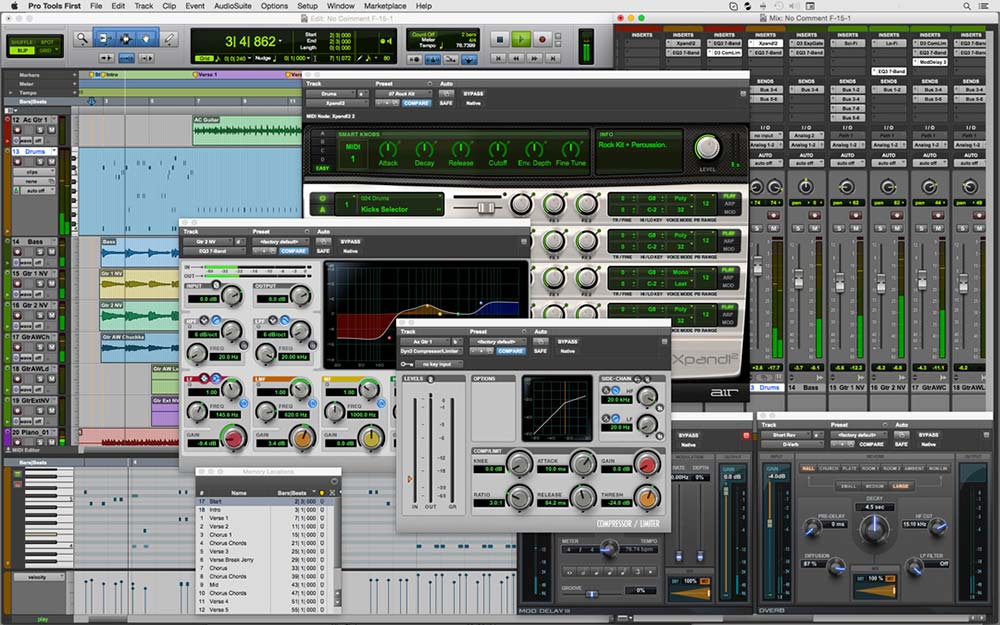
This is because modern music software and synthesizers are programmed to take advantage of the extra cores available to speed up your projects. Therefore, depending on the complexity of your projects, the more cores you can lay your hands on, the better. Modern music synthesizer software such as Fruity Loops, Cakewalk Sonar, Reason, Pro Tools, Acid, and Cubase all benefit immensely from a multi-core CPU for processing the audio beats and mixing.
RELATED ARTICLE

Best Laptop for Solidworks – Full Review
We take Workstation Laptops for a spin in this rundown of the best Lappies for CAD
RAM
The 2nd most important piece of hardware is RAM. This is because the responsiveness of your PC is dependent on how fast your RAM is. Also, you can load multiple projects simultaneously if you have loads of RAM. You need as much RAM as your motherboard can accommodate. This is true whether you want to build a PC for music production, or for other media-related stuff. In the budget category, at least 8GB of RAM is enough for most tasks. High-end builds will take as much as 64GB of RAM for maximum multitasking and processing speed.
As much as your RAM capacity matters, your RAM speed is also an important factor. Music processing and heavy multitasking need loads of fast RAM, at least in the 3000MHz speed range. Just be sure that your motherboard can support the speed specification of your choice RAM.
Optical Drive
Even though optical drives are going out of fashion, thanks to a preponderance of online media streaming services like Hulu and Netflix, good old DVDs and Blu-ray discs are still an invaluable method of data storage and archiving for music production professionals.
This is especially important given the long shelf life of optical discs. However, you can still use optical discs to deliver projects to your clients. So we included optical drives for each of our recommended builds.
Storage
You have basically 2 options.
- Primary storage
In this category, there are SATA SSDs and NVMe SSD drives. SATA SSDs are limited in speed to a maximum of 550MB/s. However, NVMe drives can achieve speeds as high as 3,500MB/s. It’s quite clear that NVMe drives are the way to go for super-fast storage, though they are more expensive than SATA SSDs.
For your boot drive, obviously, an SSD is more than adequate for fast processing and file handling. You can use a SATA SSD or an NVMe SSD for your boot drive. You can also use any of these for your cache drive (this is a special drive you can use for application caching).
- Secondary storage
The good old traditional mechanical hard drive is the only option in this area. You don’t need the fastest hard disks for this purpose, so a spinning hard drive is quite adequate. Your secondary storage is the drive where you store your user files, which include ongoing project files and completed project files. You need lots of storage space to store your beats, as WAV files can eat up a lot of storage space. You also need a large traditional hard drive for storing your processed music files.
Some users might want to use RAID configuration because of its better data protection advantage, in which case traditional spinning hard drives are pretty much handy for this purpose.
Motherboard
Most motherboards have good audio sub-systems built-in. This is not adequate for most users. A dedicated sound card is preferred in most cases. The motherboard must also support plenty of SATA ports and USB ports to enable maximum connectivity options. Avoid anything other than full ATX boards, because you may be restricted as per connectivity options.
Graphics Card
The graphics card doesn’t play any role in music production, because it is mainly designed to handle pixel processing, and then relay the same information to the monitor for output. In most of our recommended builds, we stick with integrated graphics.
However, if there is no option for integrated graphics, we recommend a low-end graphics card that is just adequate for normal Windows operations, nothing fancy. Unless you want to use your PC for other things such as gaming, apart from music mixing and beat synthesis, then you can go ahead and get a graphics card of your choice.
Sound Card
You obviously need a sound card. There are various options available, for different budgets. I’d suggest that you stick to our recommendations in the tables below. We will look at builds for the two platforms, Intel and AMD for budget, mid-range, and high-end music production PC build.
RELATED ARTICLE
Best 24″ Monitor – Full Review
Take your pick of the best 24-inch Monitors for gaming, productivity, and every other thing you can think of…
Other Important Audio Equipment you may need
External Digital Audio Converters & Audio Interfaces
Your PC’s built-in sound hardware may be perfectly adequate for everyday audio and even some music-production workloads. However, a dedicated external DAC or audio interface can provide cleaner audio conversion, better headphone amplification, lower latency, and additional inputs and outputs. External devices also move sensitive analogue audio circuitry away from potential electrical interference inside the PC.
For a serious music-production PC, a good external audio interface is therefore a worthwhile investment. We’ve selected three excellent options covering budget, mid-range, and high-end systems.

Audient Audio Interface iD4 MKII
Price: $192.00
1450 Reviews
Price incl. tax, excl. shipping

Motu M4 4×4 USB-C Audio Interface
Price: $279.95
902 Reviews
Price incl. tax, excl. shipping

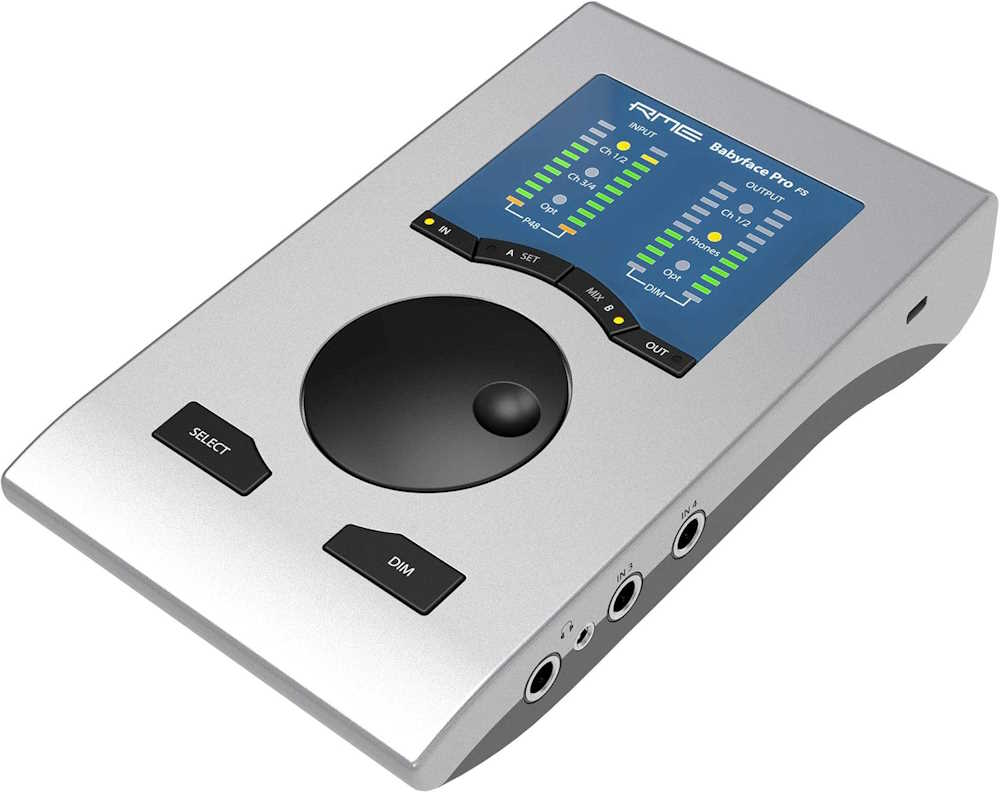
RME Babyface Pro FS USB Audio Interface
Price: $999.00
77 Reviews
Price incl. tax, excl. shipping

Budget DAC
Audient Audio Interface iD4 MKII
Audient’s iD4 MKII is an excellent choice when the PC build needs a relatively inexpensive interface without sacrificing converter quality. It provides two analogue inputs and two outputs, USB-C connectivity, a dedicated instrument input, and a powerful headphone amplifier. Its DAC has a specified 125.5 dB A-weighted dynamic range, while the ADC is rated at 120 dB.
Its simple two-channel design makes it particularly suitable for a producer recording vocals, guitar, keyboard or other single-source instruments rather than a full band simultaneously. Audient also currently lists compatibility with Windows 10/11 and modern macOS versions.
Why it belongs in the build: Excellent conversion and headphone performance for the money, while keeping the interface uncomplicated.

Mid-Range DAC
Motu M4 4×4 USB-C Audio Interface
The MOTU M4 is my mid-range pick for a serious home music-production PC. Its appeal is less about simply having good converters and more about providing a considerably more capable production hub. It gives you four analogue inputs and four outputs, MIDI connectivity, multiple monitoring options and very low-latency operation.
For a PC intended for music production, that additional connectivity makes the M4 a better long-term choice than a basic two-input interface. It is particularly attractive if the system will eventually incorporate MIDI keyboards, synthesizers, external hardware or multiple monitor/headphone connections.
Why it belongs in the build: The sweet spot between cost, conversion quality, connectivity and expandability.
High-End DAC
RME Babyface Pro FS USB Audio Interface
For the high-end build, the RME Babyface Pro FS is the strongest choice of these three. RME describes it as a 24-channel, 192 kHz professional USB audio interface, with ADAT/SPDIF optical expansion and extensive routing through its TotalMix system.
The hardware provides two microphone/line inputs, two additional line/instrument inputs, balanced outputs, two independent headphone outputs, MIDI and optical digital connectivity. Its design also allows an external ADAT converter to expand the system substantially.
The main reason to spend considerably more on RME is not merely the headline sample rate. Driver stability, low latency, routing flexibility and long-term professional support are major advantages for a dedicated music-production workstation. RME specifically emphasizes its in-house driver development and ongoing Windows and macOS support.
Why it belongs in the build: Exceptional conversion, mature drivers, very low latency and enough I/O flexibility to remain useful as the studio grows.
RELATED ARTICLE

Best Wi-Fi Routers for Gaming and Streaming
We round up the best of the best routers for gaming and streaming. Full Review and buying guide
Neumann U 87 Ai Condenser Microphone
Price: $3,750.00
8 Reviews
Price incl. tax, excl. shipping
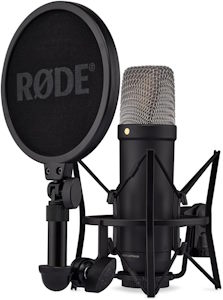
RØDE NT1 5th Gen Studio Condenser Microphone
Price: $214.00
2001 Reviews
Price incl. tax, excl. shipping
Shure SM58 Pro XLR Dynamic Vocal Microphone
Price: $109.00
14521 Reviews
Price incl. tax, excl. shipping
Microphones

Budget Mic
Shure SM58
The Shure SM58 remains an excellent inexpensive microphone for a music-production PC, particularly for vocals. Its cardioid pattern helps reject sound arriving from the sides and rear, while its rugged dynamic design makes it relatively forgiving of ordinary home-recording environments. Shure specifies a 50 Hz-15 kHz frequency response and includes an integrated spherical pop filter.
It is not as detailed or extended in the high frequencies as a good studio condenser, but its combination of price, durability and vocal performance makes it a sensible budget recommendation.
Best for: Vocal recording, home studios, guitar amps and users working in less-than-ideal rooms.

Mid-Range Mic
RØDE NT1 5th Generation
The RØDE NT1 5th Generation is my mid-range choice and arguably the best fit for the typical music-production PC. It is a large-diaphragm cardioid condenser with a 20 Hz-20 kHz frequency range, 4 dBA equivalent noise and a maximum SPL of 142 dB.
It is particularly interesting for a PC build because it supports both XLR and USB-C. Through USB, it can record in 32-bit float and use RØDE’s custom ASIO driver on Windows; through XLR, it works like a conventional studio microphone with an audio interface. That dual connectivity gives it considerable flexibility as the studio develops.
Best for: Vocals, acoustic instruments, songwriting, home studios and general-purpose recording.

High-End Mic
Neumann U 87 Ai Large-Diaphragm Condenser Microphone
For a genuinely high-end music-production workstation, the Neumann U 87 Ai is the logical step up. It is a professional large-diaphragm condenser designed for demanding studio recording, with selectable polar patterns that make it substantially more versatile than a basic cardioid microphone.
Its principal advantage is not simply a higher specification sheet. The U 87 Ai is a studio-standard microphone intended to capture vocals and instruments with the detail and tonal flexibility expected in professional recording environments.
Best for: Professional vocals, acoustic instruments, voice recording and studios where microphone quality is a major part of the recording chain.
RELATED ARTICLE

Best Digital Graphics Drawing Tablets
Here are the best drawing tablets for artists and graphic designers. Buying guide included.
What about Software?
We compile a list of the paid and free software you will likely need to set up a music studio. Here’s the breakdown.

Avid Pro Tools

Adobe Audition
Ableton Live

Steinberg Cubase

FL Studio
Propellerhead Reason
Conclusion
At this point, you pretty much have all you need to build a PC for music production and set up your studio. You’ve assembled the components and purchased additional hardware as we recommended above. So what next?
The next thing to do is to plug them all in together to get your music production PC up and running. You can follow this link for a step-by-step guide on building your own PC. Other build guides worth checking out include Photo Editing PC build, Graphic Design PC build, a Gaming PC build, and Video Editing PC build. You can also try our PC Build Calculator
Any thoughts or input? Please use the comment box below. We’d love to hear from you.