


If your wallet just filed a restraining order against you, congratulations – you are probably researching an RTX 5090 PC build cost for LLM workloads, and yes, it is exactly as expensive as your worst nightmare suggested. But here is the thing: running large language models locally is no longer just a research lab flex. In 2026, developers, AI hobbyists, and even some very serious gamers are building dedicated rigs to inference and fine-tune LLMs at home, and the RTX 5090 sits at the absolute peak of what consumer hardware can deliver for this task.
This guide breaks down two complete builds – one AMD, one Intel – so you can see exactly what you are getting into before you commit. We cover component choices, compatibility notes, platform trade-offs, and a few things nobody else bothers to mention.
Why the RTX 5090 for LLM Workloads?
The RTX 5090 ships with 32GB of GDDR7 VRAM, which is the single most important number in this conversation. Most consumer GPUs tap out well before you can load a 13B parameter model at full precision, let alone anything in the 30B to 70B range. The 5090 changes that equation entirely.
Beyond raw VRAM, Nvidia’s Blackwell architecture brings substantially improved tensor throughput compared to Ada Lovelace. For quantized models running at INT4 or INT8, the performance uplift over the previous generation is significant enough to justify the price premium for anyone doing this seriously.
There is also the software side. CUDA support, llama.cpp GPU offloading, and frameworks like Ollama and LM Studio all have mature RTX 5090 support in 2026. The ecosystem is there. The question is whether your bank account is. You can start a build with this GPU (tap the Build with This button), or simply utilize the build suggestions below.
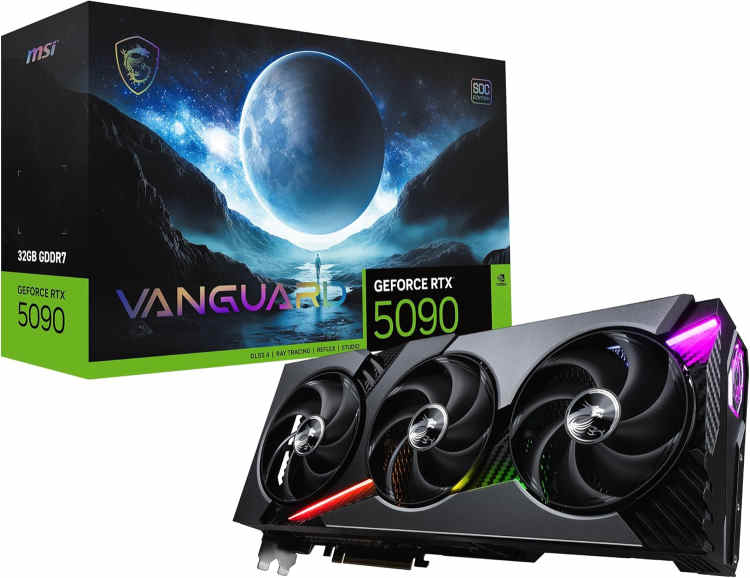
MSI Gaming RTX 5090 Vanguard SOC
The most capable consumer GPU currently available for local LLM inference. VRAM capacity is generous enough to run mid-sized models entirely on-card, avoiding the performance collapse that comes with system memory offloading. Sustained inference sessions are handled without thermal throttling, thanks to an unusually effective cooling solution. Power and case requirements are substantial; the hardware demands a build planned around it rather than dropped into one.
AMD PC Build for LLM with RTX 5090
These components are hand-picked and vetted for compatibility, though we do not guarantee availability. They are suitable for an AMD-based PC build optimized for LLM inference and fine-tuning workloads with RTX 5090 GPU acceleration. If you do not like the recommendations, you can easily swap out unwanted parts and add new ones using the AI PC Builder tool. Simply click on the BUILD/CUSTOMIZE THIS button to get started.

- CPU: Ryzen 9 9950X$499.99
Price on Newegg
Amazon Price
- Motherboard: ASUS ROG Crosshair X870E Hero$558.89
- GPU: MSI Gaming RTX 5090 Vanguard SOC (Unavailable)$4,499.99
- RAM: G.SKILL Flare X5 Series 128GB DDR5$3,499.99
- Storage 1: Samsung 9100 Pro NVMe PCIe 5 2TB $399.99
- Storage 2: Seagate FireCuda 530 4TB (Unavailable)$549.99
- PSU: Lian Li Edge 1000W Fully Modular ATX Power Supply Cybernetics Gold Efficiency $147.99
- Case: Phanteks Evolv X2 Mid-Tower Gaming Chassis White (Unavailable)$119.00
- CPU Cooler: Thermalright Phantom Spirit 120 EVO CPU Cooler$46.90
TOTAL COST: $10,322.73
📊 Price History
[Prices updated: 1:23pm, 10/02/2026]
Why AMD for This Build?
The Ryzen 9 9950X is a 16-core beast that handles parallel preprocessing tasks exceptionally well. When you are tokenizing large datasets or running inference pipelines that lean on the CPU between GPU calls, those extra cores earn their keep in ways that a gaming-oriented chip simply cannot match.
The X870E platform supports PCIe 5.0 across all primary slots, which means the RTX 5090 operates at its full bandwidth ceiling. Combined with DDR5-6000 at 128GB total, this build can hold large model weights in system RAM and page them to the GPU efficiently without constant disk I/O bottlenecks.
AMD Build Strengths
- Superior multi-threaded CPU performance for preprocessing pipelines
- Excellent memory bandwidth with DDR5-6000 on X870E
- Strong platform longevity; AM5 socket still has room to grow in 2026
- Thermalright cooler keeps the 9950X well within thermal limits under sustained load
AMD Build Weaknesses
- X870E boards carry a premium over mid-range alternatives
- 128GB DDR5 kits remain expensive in 2026, though prices have eased somewhat
Intel PC Build for LLM with RTX 5090
These components are hand-picked and vetted for compatibility, though we do not guarantee availability. They are suitable for an Intel-based PC build optimized for LLM inference and fine-tuning workloads with RTX 5090 GPU acceleration. If you do not like the recommendations, you can easily swap out unwanted parts and add new ones using the AI PC Builder tool. Simply click on the BUILD/CUSTOMIZE THIS button to get started.
- CPU: Core Ultra 9 285K$522.99
- Motherboard: msi MEG Z890 ACE Gaming$589.99
- GPU: MSI Gaming RTX 5090 Vanguard SOC (Unavailable)$4,499.99
- RAM: G.SKILL Flare X5 Series 128GB DDR5$3,499.99
- Storage 1: Samsung 9100 Pro NVMe PCIe 5 2TB $399.99
- Storage 2: Seagate FireCuda 530 4TB (Unavailable)$549.99
- PSU: Lian Li Edge 1000W Fully Modular ATX Power Supply Cybernetics Gold Efficiency $147.99
- Case: Phanteks Evolv X2 Mid-Tower Gaming Chassis White (Unavailable)$119.00
- CPU Cooler: Thermalright Phantom Spirit 120 EVO CPU Cooler$46.90
TOTAL COST: $10,376.83
📊 Price History
[Prices updated: 1:23pm, 10/02/2026]
Why Intel for This Build?
The Core Ultra 9 285K brings Intel’s Arrow Lake architecture with a tile-based design that separates compute and I/O dies. For LLM workloads, the integrated NPU is a bonus for lighter inference tasks, offloading some compute from the GPU when running smaller quantized models.
The Z890 platform supports DDR5-6400 natively, and the Klevv Cras V kit at that speed is a surprisingly strong value pick in 2026. The be quiet! Dark Rock Pro 5 is a near-silent dual-tower cooler that handles the 285K’s power draw without drama, which matters when your rig is running inference jobs for hours at a stretch.
Intel Build Strengths
- Slightly lower total build cost versus the AMD equivalent
- Integrated NPU adds a secondary inference path for lighter models
- Z890 boards offer excellent PCIe 5.0 lane allocation for the RTX 5090
- The Thermalright Phantom Spirit 120 EVO delivers exceptional thermal performance with near-zero noise
Intel Build Weaknesses
- Arrow Lake’s multi-threaded performance trails Ryzen 9950X in heavily threaded workloads
- LGA1851 platform longevity is less certain compared to AM5
- Power consumption under full load is higher than AMD’s equivalent configuration
- RAM costs still high
Putting it Together
Building either of these rigs follows the same general sequence: install the CPU and cooler on the motherboard outside the case first, seat the RAM, then mount the board. The RTX 5090 is a triple-slot card in most configurations, so verify your case clears it before ordering. The Vanguard SOC measures 357mm in length, and the Evolv X2 supports GPU lengths up to 380mm, leaving 23mm of clearance. The card is also a 3-slot design at 76mm thick, which the case’s eight PCIe slots accommodate without issue.
Cable management matters more in a workstation-class build than in a gaming rig because sustained loads generate sustained heat. Block your airflow with a rats nest of cables and your thermals will punish you during long inference runs. Take the extra twenty minutes. It’s worth noting that the PCIe power connector positions in the Evolv X2 sit at an awkward height relative to where large GPUs land, which can make the 16-pin cable management less clean than expected. It is not a fitment problem, but it is worth accounting for when planning your build.
If this is your first time assembling a machine from scratch, or you want a structured walkthrough to follow alongside your build, this step-by-step DIY PC build guide covers the full process from unboxing to first boot in plain language.
Power Supply Notes
The RTX 5090 has a TDP of around 575W on its own. Add a 9950X or 285K under load and you are looking at a sustained system draw north of 800W. The 1000W to 1050W PSU recommendations in both builds are not excessive; they are the sensible floor. Running a 5090 system on anything below 850W is a bad idea dressed up as frugality.
Both PSUs listed use the 16-pin 12VHPWR connector natively, which the RTX 5090 requires. Verify your chosen PSU ships with this cable before purchasing.
Optimizing Your Build for LLM Workloads
Hardware alone does not determine LLM performance. Software configuration closes a significant gap between a well-tuned system and one that is technically identical on paper but runs 30% slower because nobody touched the settings.
VRAM and Model Quantization
The RTX 5090’s 32GB VRAM fits a 70B parameter model comfortably at Q4 quantization using llama.cpp. For Q8 or full FP16 precision, you will hit the ceiling around 30B to 34B parameters. Plan your model selection around these numbers rather than discovering the limit mid-session.
Tools like Ollama and LM Studio handle quantization selection automatically, but understanding the trade-off between precision and speed helps you pick the right format for your use case. Q4_K_M is the standard sweet spot for most users in 2026: fast, fits in VRAM, and produces output quality that is difficult to distinguish from full precision in most practical applications.
System RAM Configuration
128GB of system RAM is not overkill for this use case. When a model exceeds your VRAM, the overflow spills into system memory. With 128GB available, even a partially VRAM-offloaded 70B model runs at tolerable speeds rather than grinding to a halt on disk swap.
Enable XMP or EXPO in BIOS immediately after first boot. Both builds use kits rated above DDR5-5600, and neither will run at rated speed without the profile enabled. This is one of the most commonly skipped steps and one of the most consequential for memory-bandwidth-sensitive workloads.
Storage Layout
Keep your operating system and active model files on the primary NVMe drive. Use the secondary drive for model storage and datasets. Model loading speed correlates directly with NVMe throughput, and a PCIe 5.0 drive like the Crucial T705 reduces cold-load times noticeably compared to a SATA SSD.
Cooling and Sustained Performance
Unlike gaming, which delivers workload spikes, LLM inference is a sustained load. Your GPU will sit at near-maximum power draw for minutes or hours at a time. Make sure your case has adequate positive airflow and that the GPU’s thermal paste is fresh if you are working with a used card.
Both coolers in these builds – the Thermalright Phantom Spirit and the be quiet! Dark Rock Pro 5 – are rated well above the TDP of their respective CPUs. That headroom matters when ambient temperatures climb and workloads do not let up.
More like this >>
Best PC Build for AI Development & Machine Learning
Best PC Build for AI Video Generation in 2026
Best PC Build for Data Science and Machine Learning
Best PC Build for Deep Learning
Best PC Build for Local AI: Top 5 Powerhouse Rigs
Most Affordable AI Workstation for Gaming and Development
Conclusion
An RTX 5090 PC build cost for LLM runs somewhere between $8,500 and $9,000 depending on platform, RAM pricing at the time of purchase, and which RTX 5090 variant you land on. Neither of these builds is cheap. But for what they deliver – local inference on 70B models, fine-tuning capability, and a machine that doubles as a genuinely serious gaming rig – the cost is defensible for anyone using it daily.
The AMD build edges ahead for pure multi-threaded throughput and platform longevity. The Intel build offers a marginally lower entry cost and the NPU bonus for lighter workloads. Both are legitimate choices in 2026, and both will run circles around anything a cloud API gives you for the same monthly spend over a two-year horizon.
Pick your platform, verify your PSU headroom, enable XMP, and load your first 70B model. The first time it responds at full VRAM speed, you will understand exactly why people spend this kind of money on local inference hardware. Get building!
All Articles