



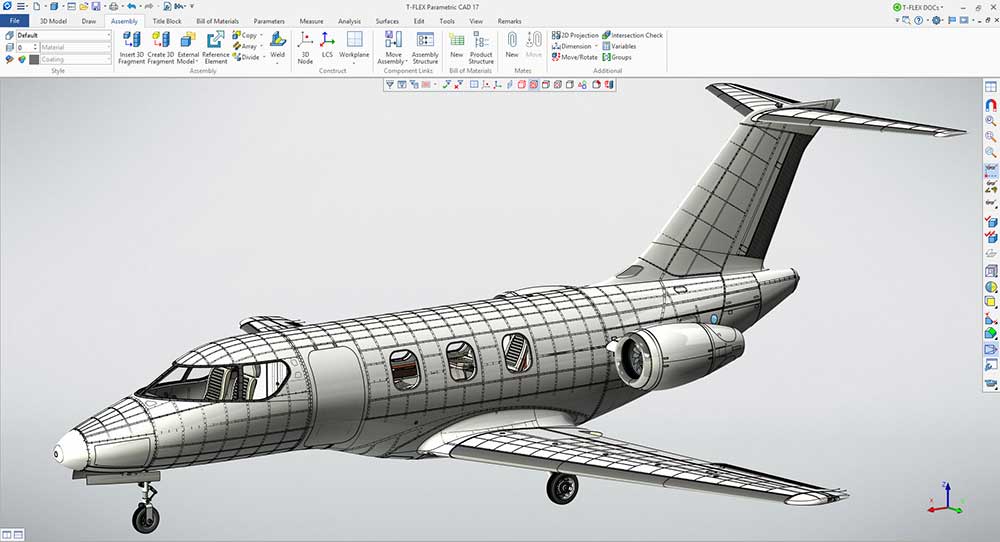
Computer-Aided Design or CAD requires specific hardware configuration for best performance. If you need guidance on the best CAD Workstation builds, this guide is for you. Computer-Aided Design, Computer-Aided Engineering, and Computer-Aided Manufacturing are related disciplines that require specific hardware for the best output possible. CAD/CAE/CAM software is a specialized group of software designed for drafting, modeling, and rendering 3-dimensional models on the computer.
So, what’s the best Workstation PC build for CAD in 2026? In a nutshell, the PC build for a CAD Workstation should have at least a 6-core CPU, at least 16 GB of RAM, a fast NVMe drive for the OS, and preferably an optimized GPU such as a Quadro. This should provide the best performance for most users.
The models could be anything from architectural structures such as buildings, or structural designs of physical structures like bridges, iconic structures, high-rise buildings, etc. They could also be machinery, tools, equipment, and other such stuff. CAD cuts across popular software such as AutoCAD, ArchiCAD, Solidworks, Catia, Autodesk Inventor, Autodesk Revit, FreeCAD, Onshape, Creo, AutoCAD Architecture, and a host of others.
When building a PC for CAD, you need to match the best components for the best performance. We are going to examine the most important hardware requirements to build a CAD-capable PC.
This page contains affiliate links. We may receive a small commission for qualifying purchases made through affiliate links on this page, at no extra cost to you. This is to support the work we are doing.
RELATED ARTICLE

Best 3D Animation and Render Desktop PC Build – Full Guide
This guide features the indomitable AMD Threadripper CPU. Build a kick-ass render PC
AMD CAD PC BUILDS
AMD Budget CAD PC Build
Choose this build if you want a budget CAD PC based on the AMD platform. All parts are vetted for compatibility. If you don’t like the recommendations, you can easily swap out unwanted parts and add new ones using the AI PC Builder tool. Simply click on the BUILD/CUSTOMIZE THIS button to get started.
- CPU: Ryzen 7 7800X3D$359.99
Price on Newegg
Amazon Price
- Motherboard: ASUS TUF Gaming B650-E WiFi$199.00
- GPU: PNY Quadro RTX 4000$242.99
- RAM: Crucial Pro DDR5 RAM 32GB Kit (Unavailable)$565.00
- Storage 1: Samsung 990 PRO SSD NVMe 2TB$389.99
- CPU Cooler: Noctua NH-D15 chromax Black$119.95
- Case: Montech XR ATX Mid-Tower PC Gaming Case$69.90
- PSU: Cooler Master MWE Gold Full Modular 80+ Gold 750W$104.03
TOTAL COST: $2,050.85
📊 Price History
[Prices updated: 11:30pm, 10/06/2026]
AMD Mid-Range CAD PC Build
Choose this build if you want a mid-range CAD PC based on the AMD platform. All parts are vetted for compatibility. If you don’t like the recommendations, you can easily swap out unwanted parts and add new ones using the AI PC Builder tool. Simply click on the BUILD/CUSTOMIZE THIS button to get started.
- CPU: Ryzen 9 9950X3D$689.47
- Motherboard: ASRock AMD X870E Taichi Lite$299.99
- RAM: Patriot Viper Venom DDR5 RAM 64GB $1,587.74
- GPU: HP Quadro RTX 5000$651.00
- Storage 1: Silicon Power 4TB UD90 NVMe $519.97
- CPU Cooler: MSI Mag Coreliquid A13 360 AIO ARGB Liquid Cooler$78.00
- Case: Fractal Design North XL $155.99
- PSU: ASRock Steel Legend SL-750G 750W Full Modular 80 Plus Gold Cybernetics Platinum (Unavailable)$69.99
TOTAL COST: $4,052.15
📊 Price History
[Prices updated: 11:30pm, 10/06/2026]
RELATED ARTICLE

Best Gaming Laptops under 3000 Dollars
We review 12 gaming laptops you can get right now, with full specifications. Buying guide included.
AMD High-End CAD PC Build
Choose this build if you want a high-end CAD PC based on the AMD platform. All parts are vetted for compatibility. If you don’t like the recommendations, you can easily swap out unwanted parts and add new ones using the AI PC Builder tool. Simply click on the BUILD/CUSTOMIZE THIS button to get started.
- CPU: Threadripper Pro 9985WX$7,731.44
- Motherboard: ASUS Pro WS TRX50-Sage$849.99
- RAM: A-Tech 256GB Kit ECC-Registered 256GB (Unavailable)$1,453.97
- GPU: PNY Quadro RTX 8000$2,819.71
- Storage 1: Seagate Barracuda 8TB$279.99
- CPU Cooler: SilverStone Technology XE360‑TR5 AIO Liquid Cooler$393.41
- Case: Fractal Design Define 7 XL$239.99
- PSU: ASUS ROG Loki 1200W Platinum White Edition 80+ Platinum (Unavailable)$306.84
- Storage 2: Lexar 2TB NM790 SSD PCIe Gen4 NVMe M.2$319.99
TOTAL COST: $14,395.33
📊 Price History
[Prices updated: 11:30pm, 10/06/2026]
RELATED ARTICLE

Best Digital Graphics Drawing Tablets
Here are the best drawing tablets for artists and graphic designers. Buying guide included.
INTEL CAD PC BUILDS
Intel Budget CAD PC Build
Choose this build if you want a budget CAD PC based on the Intel platform. All parts are vetted for compatibility. If you don’t like the recommendations, you can easily swap out unwanted parts and add new ones using the AI PC Builder tool. Simply click on the BUILD/CUSTOMIZE THIS button to get started.
- CPU: Core i7-14700K$269.99
- Motherboard: ASUS TUF Gaming Z790 BTF WiFi$625.98
- GPU: PNY Quadro RTX A2000$647.96
- RAM: Teamgroup T-Create Expert Overclocking 32GB DDR5 Kit$509.99
- Storage 1: Samsung 990 PRO SSD NVMe 2TB$389.99
- CPU Cooler: be quiet! Pure Rock 2 (Unavailable)$54.90
- Case: Phanteks PHEC370A Mid Tower Gaming Case (Unavailable)$56.98
- PSU: MSI Mag A650GL Gaming PSU Full Modular 80+ Gold 650W$96.99
TOTAL COST: $2,652.78
📊 Price History
[Prices updated: 11:30pm, 10/06/2026]
RELATED ARTICLE

Best Gaming PC Build for all Budgets – Full Guide
We take you through our best guide yet on the best gaming PC build for all budgets.
Intel Mid-Range CAD PC Build
Choose this build if you want a mid-range CAD PC based on the Intel platform. All parts are vetted for compatibility. If you don’t like the recommendations, you can easily swap out unwanted parts and add new ones using the AI PC Builder tool. Click on the BUILD/CUSTOMIZE THIS button to get started.
- CPU: Core i9-14900K$375.99
- Motherboard: ASUS TUF Gaming Z790 Plus WiFi$179.99
- GPU: HP Quadro RTX 4000$289.99
- RAM: G.Skill Trident Z5 Neo RGB Series 64GB$969.99
- Storage 1: Kingston NV3 1TB M.2 2280 NVMe SSD$156.99
- CPU Cooler: Lian Li Galahad II Trinity 360mm (Unavailable)$148.99
- PSU: Cooler Master MWE Gold Full Modular 80+ Gold 850W$144.99
- Case: Antec C8 ARGB Full Tower E-ATX PC Case $149.99
TOTAL COST: $2,416.92
📊 Price History
[Prices updated: 11:30pm, 10/06/2026]
RELATED ARTICLE

Best Wi-Fi Routers for Gaming and Streaming
We round up the best of the best routers for gaming and streaming. Full Review and buying guide
Intel High-End CAD PC Build
Choose this build if you want a high-end CAD PC based on the Intel platform. All parts are vetted for compatibility. If you don’t like the recommendations, you can easily swap out unwanted parts and add new ones using the AI PC Builder tool. Click on the BUILD/CUSTOMIZE THIS button to get started.
- CPU: Xeon W9-3475X (Unavailable)$4,599.99
Price on eBay |
Price on Manufacturer
- Motherboard: ASUS Pro WS W790 Sage SE$1,009.99
- GPU: Lanner Quadro RTX 8000$2,468.96
- RAM: Samsung Memory ECC-Registered 256GB $1,799.00
- Storage 1: Lexar 8TB NM790 SSD PCIe Gen4 NVMe M.2 (Unavailable)$1,549.99
- CPU Cooler: Noctua NH-U14S DX‑4677 CPU Cooler$139.95
- Case: Fractal Design Define 7 XL$239.99
- PSU: ASUS ROG Loki 1200W Platinum White Edition 80+ Platinum (Unavailable)$306.84
- Storage 2: Klevv Cras C910 2TB$276.99
TOTAL COST: $12,391.70
📊 Price History
[Prices updated: 11:30pm, 10/06/2026]
Most important Components for the best CAD Workstation build
PROCESSOR
Your processor must be powerful enough to handle the complex 2D or 3D models inside your CAD software. Getting a Core i3 or Core i5 processor is not recommended, even though your software will still run. But in terms of performance, you will be severely limited.
It is recommended to go for the Intel i7/i9 line of processors for CAD, or, if money isn’t an issue and you want to run simulations too, then go for a Threadripper chip. We’ve put together a Threadripper build you should consider. The AMD Threadripper series offers massive performance in multi-threaded rendering, and they’re a good option to future-proof your workstation.
RAM
You’re going to need large amounts of RAM for the best performance. For budget builds, you should go for at least 8GB, but you are going to have performance issues if you are handling large models. It is recommended to go for 16GB and above, for the best performance.
GRAPHICS CARD
When it comes to choosing a graphics card for your CAD PC, it is quite tempting to go for a gaming graphics card, probably because of the cheaper prices. The problem is that gaming cards are not engineered specifically to run CAD software. Gaming cards specialize in drawing high-frame-rate game graphics, but their performance is limited when it comes to handling CAD software. It is recommended to go for an Nvidia Quadro or an AMD Radeon Pro GPU for CAD, though GTX 1080 will still perform ok. But, if you are serious about CAD, by all means, go for a Quadro or a Radeon Pro GPU.
CAD/CAM Software for CAD Workstation Build
Here’s an aggregated list of the best options for a CAD Workstation build you should consider.
| APP | DEPLOYMENT | PLATFORM | COST |
|---|---|---|---|
| Solid Edge CAM Pro | Desktop | Windows | Ranges from $75/seat/month (Design and Drafting) to $329/seat/month (Premuim) |
| GibbsCam | Desktop | Windows | Contact GibbsCAM to obtain current pricing |
| Fusion 360 | Cloud | Windows, Mac, Linux | $60/month or $495/year |
| Solidworks CAM | Desktop | Windows | $3,995 per license |
| CATIA | Desktop/Cloud | Windows | $10,000 per license |
| OpenSCAD | Desktop | Windows | Free |
| Rhino | Desktop | Windows, Mac | Starts at 995€ for Windows / 695€ for Mac |
| SolidCAM | Desktop | Windows | Contact SolidCAM for pricing details. |
| HSM | Desktop | Windows | Monthly – $60 1 Year – $495 3 YearS – $1,335 |
| CAMWorks | Desktop | Windows | Contact CAMWorks to obtain current pricing |
| NXCam | Desktop, Mac | Windows, Mac | Contact NX CAM to obtain current pricing |
| MasterCAM | Desktop | Windows | Between $4,000 and $40,000 per seat |
| PowerMill | Desktop | Windows | From $65 |
| FeatureCAM | Desktop | Windows | From $65 |
| Cimatron | Desktop | Windows | Contact Cimatron to obtain current pricing |
| SprutCAM | Desktop | Windows | From $895 |
| SurfCAM | Desktop | Windows | Contact Surfcam to obtain current pricing |
| AlibreCAM | Desktop | Windows | $2,375 (Expert), $4,750 (Pro) |
| AutoCAD | Desktop | Windows | $185/month or $1,470/year |
| EXAPT | Desktop | Windows | Contact EXAPT to obtain current pricing |
| Inventor CAM | Desktop | Windows | $340/month, $2,720/year, $7,345/3 years |
| TopSolid’Cam | Desktop | Windows | From $3,995 |
| MachineWorks | Desktop | Windows | Contact MachineWorks to obtain current pricing |
| SmartCAM | Desktop | Windows | From USD $25/month |
| Tebis CAM | Desktop | Windows | Contact Tebis CAM to obtain current pricing |
| TinkerCAD | Cloud | Windows | Free |
| FreeCAD | Desktop | Windows, Mac, Linux | Free |
| BlocksCAD | Cloud | Windows | Free |
| Creo | Desktop | Windows | $2,310 per license |
Concluding thoughts
These recommendations for CAD workstation build may not work for everyone, but specifically for those who really need it and have no idea which components to get. You can easily get a technician to put it together for you, or you can follow our guide on how to build a PC step by step. Also, tutorials on Youtube will go a long way if you prefer to go that route.
You can check our other build guides for more guides. We have lots of reviews to also check out. Please let us know in the comment section what you think.
ALL ARTICLES