


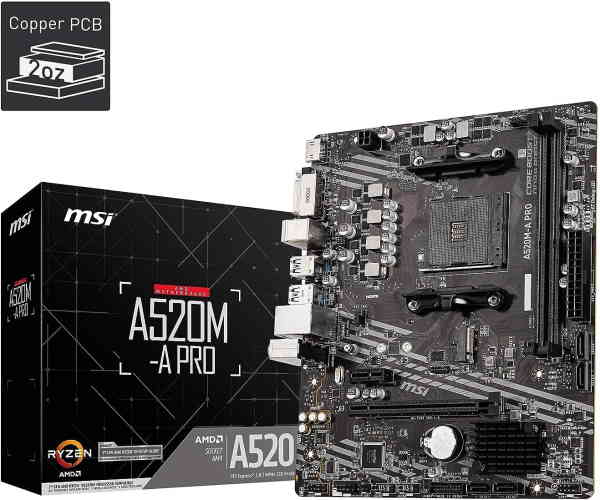
MSI A520M-A Pro Gaming Motherboard
The MSI A520M-A Pro Gaming Motherboard is a budget-friendly foundation for AMD Ryzen builds, offering essential features and reliable performance for gamers and PC enthusiasts. Designed for the AM4 platform, this micro-ATX board supports a wide range of AMD processors, from entry-level Athlon to the latest Ryzen 5000 series, making it a versatile choice for both new builds and upgrades.
Target Audience
This motherboard is ideal for budget-conscious gamers, office users, and first-time PC builders who want a solid platform without breaking the bank. It's also a great option for upgrading an older AM4 system with modern features like M.2 storage and USB 3.2 Gen 1 connectivity.
Key Features
- AMD AM4 Socket: Supports AMD Ryzen 5000, 4000, 3000 series and Athlon processors.
- DDR4 Memory: Two DIMM slots, up to 64GB, with overclocking support up to 4600MHz (OC) for enhanced performance.
- Storage Options: Includes an M.2 slot for ultra-fast NVMe SSDs and four SATA 6Gb/s ports for traditional drives.
- Connectivity: USB 3.2 Gen 1 ports (Type-A and Type-C), HDMI and DVI outputs for integrated graphics, and Gigabit LAN for stable networking.
- Form Factor: Micro-ATX size fits in most cases, offering a compact yet expandable layout.
Performance Highlights
With PCIe 3.0 support, the A520M-A Pro delivers ample bandwidth for graphics cards and NVMe SSDs. The board's memory overclocking capability up to 4600MHz ensures snappy system response and improved frame rates in memory-sensitive games. The M.2 slot supports PCIe 3.0 x4 drives, enabling rapid boot times and game loading.
Use Cases
Perfect for building a budget gaming rig with a Ryzen 5 5600 or Ryzen 7 5700X, paired with a mid-range GPU. It also serves well as a home office PC, media center, or entry-level content creation workstation. The DVI and HDMI ports allow for multi-monitor setups using AMD APUs with integrated graphics.
Why Choose MSI A520M-A Pro?
MSI's reputation for quality and durability is evident in this board's solid build, including military-class components and a user-friendly BIOS. The A520 chipset provides all essential features for mainstream users, while the mATX form factor keeps the build compact and cost-effective. Whether you're upgrading or building from scratch, this motherboard offers excellent value.
Key Specifications
Detailed Parameters
- Platform:
- AMD
- Socket:
- AM4
- RAM Type:
- DDR4
- Number of RAM Slots:
- 2
- Maximum RAM/slot:
- 32
- Maximum RAM Capacity in GB:
- 64
- PCI Express Version:
- 3
- Form Factor:
- Micro-ATX
- Maximum RAM Speed in MHz:
- 4600
- ECC:
- No
- Chipset:
- A520
- SupportedPlatforms:
- AMD Consumer
Pros
- Supports latest AMD Ryzen 5000 series processors
- M.2 slot for high-speed NVMe SSDs
- Memory overclocking up to 4600MHz
- Compact mATX form factor fits small cases
- Affordable price point for budget builds
Cons
- Only two RAM slots limit future expansion
- No PCIe 4.0 support (limited to 3.0)
- Limited USB ports on rear I/O