


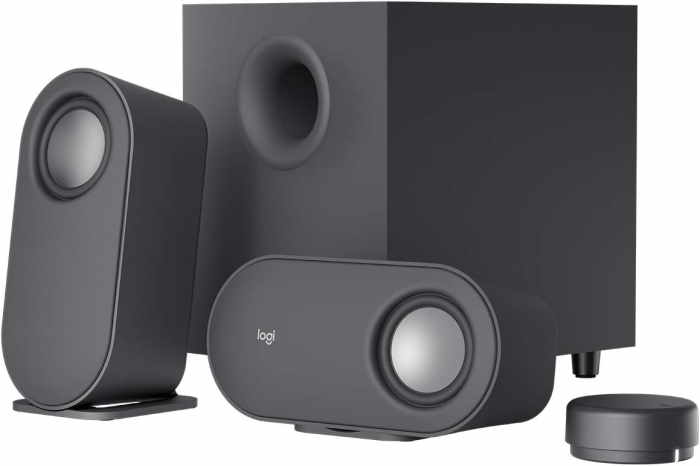
Logitech Z407 Computer Speakers with Subwoofer
Experience a new level of audio immersion with the Logitech Z407 computer speakers with subwoofer. Designed to deliver powerful, detailed sound, this 2.1 speaker system brings your entertainment to life—whether you're gaming, streaming movies, or listening to your favorite playlists. With 80 watts of peak power, the Z407 produces rich, room-filling audio with deep, punchy bass that you can feel.
Who Is It For?
The Logitech Z407 is perfect for professionals, students, and entertainment enthusiasts who want high-quality sound without the complexity of a full surround system. It's an ideal upgrade for desktop setups, small living rooms, or dorm rooms where space is limited but audio quality matters. If you value versatility and ease of use, the Z407 offers multiple connectivity options to suit any device.
Key Features
- Powerful 80W Output: Enjoy clear highs, detailed mids, and booming lows with 80 watts of peak power, delivering an immersive audio experience.
- Versatile Connectivity: Connect via Bluetooth, USB, or the included 3.5mm aux input—switch between devices effortlessly.
- Wireless Control Dial: A unique, palm-sized dial lets you adjust volume, bass, and power from your desk, with a convenient play/pause button for music control.
- Rich Subwoofer: The down-firing subwoofer adds deep, resonant bass that enhances movies, music, and games.
- Compact Satellite Speakers: The angled satellite speakers are designed to direct sound toward you for optimal stereo imaging, while their small footprint saves desk space.
Performance and Sound Quality
The Z407's 80-watt system ensures that every note is reproduced with clarity and precision. The satellite speakers handle mid and high frequencies with accuracy, while the subwoofer delivers low-end punch that adds excitement to action scenes and bass-heavy tracks. The result is a balanced, dynamic soundstage that outperforms typical built-in monitor speakers.
Use Cases
Whether you're working from home and need clear audio for video conferences, gaming and want to hear every footstep, or hosting a small gathering and need background music, the Logitech Z407 adapts to your needs. Its Bluetooth capability lets you stream from your smartphone or tablet, while the USB connection ensures a stable, high-quality link to your computer.
Easy Setup and Control
Setting up the Z407 is a breeze—simply plug in the speakers and subwoofer, connect to your device via Bluetooth or USB, and you're ready to go. The wireless control dial gives you tactile control over volume and bass, so you can fine-tune the sound without reaching for your computer. The dial also includes a headphone jack for private listening.
Upgrade your audio experience with the Logitech Z407 computer speakers with subwoofer—a perfect blend of performance, convenience, and style.
Key Specifications
Pros
- Powerful 80W output with deep bass
- Multiple connectivity options (Bluetooth, USB, 3.5mm)
- Convenient wireless control dial with bass adjustment
- Compact satellite speakers save desk space
- Easy setup and intuitive controls
Cons
- No optical or RCA inputs for TV connectivity
- Subwoofer may be too large for very small desks
- Control dial requires batteries (not included)