


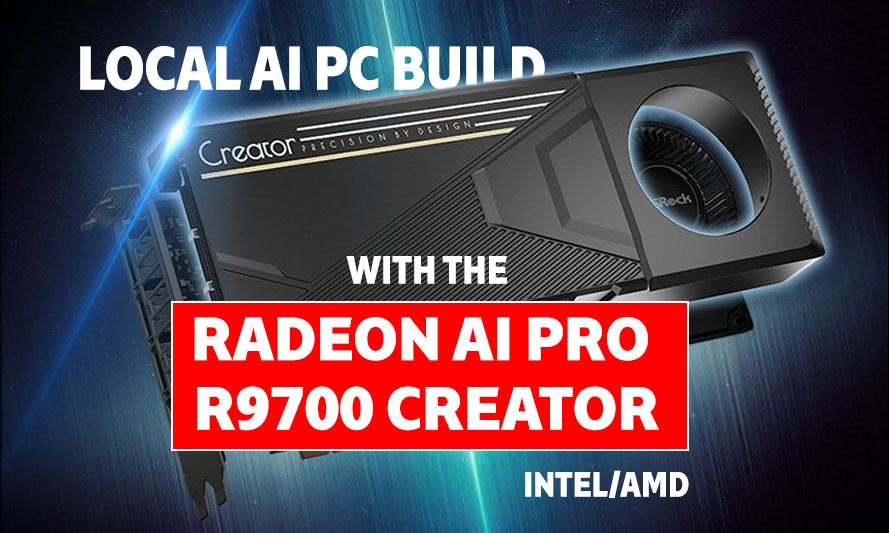
If your current rig is still choking on local LLM inference while your GPU sits there collecting dust like a participation trophy, it might be time to rethink your entire setup. A local AI PC build with the Radeon AI PRO R9700 Creator is the kind of machine that makes enthusiasts stop doom-scrolling benchmark threads and actually open their wallets. AMD’s Radeon AI PRO R9700 is not a gaming card with an AI sticker slapped on the box; it is a purpose-built workstation-class GPU with serious VRAM headroom and dedicated AI compute, and in 2026, that matters more than ever for anyone running models locally.
This guide walks through two complete builds, one on AMD and one on Intel, both centred on the R9700 Creator as the GPU anchor. Whether you are running Stable Diffusion XL, fine-tuning smaller language models, or just want a machine that handles creative workloads without phoning home to a cloud server, these configurations are built for that exact use case.
About the Radeon AI PRO R9700 Creator
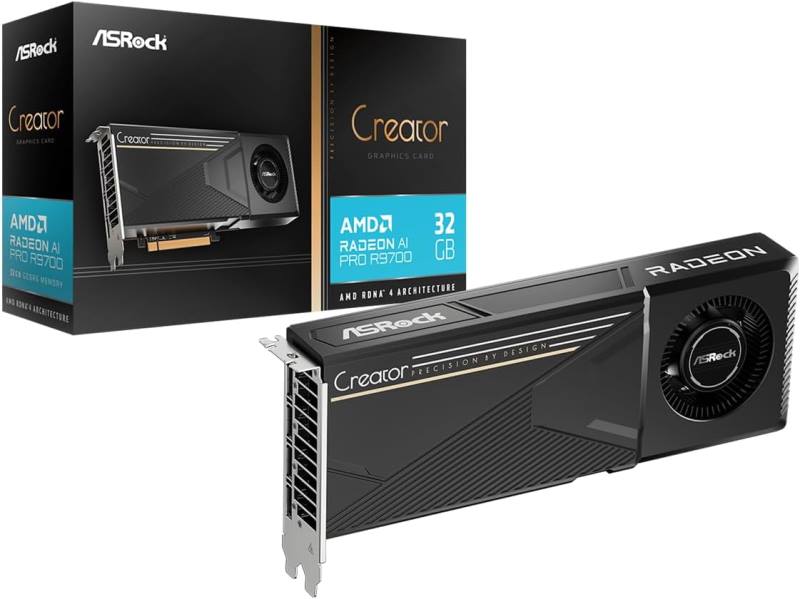
ASRock Radeon AI PRO R9700 Creator
The ASRock Radeon AI PRO R9700 Creator is built for advanced local AI workloads, offering high-speed compute performance for running AI models, machine learning tasks, content generation, and data processing directly on your workstation. With a large memory capacity and optimized architecture, it delivers smooth performance for AI development, LLM inference, creative workflows, and professional applications without relying heavily on cloud-based services. It is an ideal GPU for creators, developers, and AI enthusiasts building powerful local AI setups.
The Radeon AI PRO R9700 Creator is AMD’s answer to the growing demand for local AI processing on consumer and prosumer hardware. It ships with a substantial VRAM pool, hardware-accelerated matrix operations, and ROCm support that has matured considerably since the early days when AMD’s software stack felt like a beta test you were paying full price for.
In practical terms, this card handles multi-billion parameter models at comfortable inference speeds, making it genuinely competitive for tasks like image generation, video upscaling, and running quantised LLMs locally. It also games exceptionally well, so you are not sacrificing your weekend Elden Ring sessions for the privilege of running AI workloads.
The ROCm 7.x ecosystem in 2026 has closed much of the software gap that once made NVIDIA feel like the only serious option for local AI. AMD’s MIOpen and HIP libraries now cover the vast majority of popular frameworks, including PyTorch and ONNX Runtime, without requiring a PhD in driver archaeology to get things working.
AMD PC Build for Local AI with the Radeon AI PRO R9700 Creator
These components are hand-picked and vetted for compatibility, though we do not guarantee availability. They are suitable for an AMD-based PC build optimised for local AI workloads and high-performance creative computing. If you do not like the recommendations, you can easily swap out unwanted parts and add new ones using the AI PC Builder tool. Simply click on the BUILD/CUSTOMIZE THIS button to get started.

- CPU: Ryzen 9 9950X$498.00
Price on Newegg
Amazon Price
- Motherboard: ASUS ProArt X870E Creator WiFi (Used – Like New)$419.97
- GPU: ASRock Radeon AI PRO R9700 Creator$1,699.99
- RAM: TEAMGROUP T-Force Delta RGB DDR5 64GB$989.99
- Storage 1: Sabrent Rocket 5 2TB Advanced Performance Internal NVMe$349.99
- Storage 2: Seagate FireCuda 530 4TB (Unavailable)$549.99
- PSU: be quiet! Power Zone 2 850W 80 Plus$119.90
- Case: Lian Li Dynamic EVO XL$254.99
- CPU Cooler: Thermalright Phantom Spirit 120SE$35.90
TOTAL COST: $4,918.72
📊 Price History
[Prices updated: 12:55am, 08/26/2026]
The AMD platform here is built around the Ryzen 9 9950X, which brings 16 cores of Zen 5 architecture to the table. For local AI workloads, CPU-side preprocessing and tokenisation benefit directly from high core counts, and the 9950X does not disappoint. Pair it with a high-bandwidth DDR5 kit and a PCIe 5.0 NVMe drive, and you have a system that keeps the R9700 Creator fed without any bottleneck anxiety.
The ASUS ProArt X870E-Creator WiFi is a natural fit here; it is designed with content creators and AI workstation users in mind, offering robust VRM delivery for sustained heavy loads, Thunderbolt 4, and dual 10GbE networking. The 64GB DDR5 kit from TeamGroup gives you enough system RAM to handle large model weights being staged before offload to the GPU, which becomes relevant when you start pushing 30B+ parameter models.
The Thermalright Phantom Spirit 120 SE handles the 9950X’s thermal demands well under sustained AI workloads, where the CPU rarely gets a break. If you prefer an AIO, a 360mm unit from be quiet! would slot in cleanly on the O11 Dynamic EVO XL chassis, which has the airflow geometry to support either configuration.
Intel PC Build for Local AI with the Radeon AI PRO R9700 Creator
These components are hand-picked and vetted for compatibility, though we do not guarantee availability. They are suitable for an Intel-based PC build optimised for local AI workloads and high-performance creative computing. If you do not like the recommendations, you can easily swap out unwanted parts and add new ones using the AI PC Builder tool. Simply click on the BUILD/CUSTOMIZE THIS button to get started.
- CPU: Core Ultra 9 285K$494.99
- Motherboard: msi MEG Z890 ACE Gaming$600.33
- GPU: ASRock Radeon AI PRO R9700 Creator$1,699.99
- RAM: Klevv Cras V RGB DDR5 64GB$1,049.99
- Storage 1: Inland TN470 SSD 2TB Gen4 NVMe$304.99
- Storage 2: Kingston Fury Renegade 4TB PCIe Gen 4.0 NVMe$799.95
- PSU: ASRock Steel Legend 1000W 80 Plus Gold Cybenetics Platinum$104.99
- Case: Fractal Design Torrent RGB Black ATX Airflow Mid Tower$229.99
- CPU Cooler: be quiet! Dark Rock 5$64.90
TOTAL COST: $5,350.12
📊 Price History
[Prices updated: 12:55am, 08/26/2026]
The Intel build centres on the Core Ultra 9 285K, Intel’s flagship Arrow Lake-S processor that brings a hybrid architecture well-suited to the mixed workloads that local AI computing demands. The NPU on the 285K handles certain inference preprocessing tasks independently, reducing pressure on the R9700 Creator for lighter operations and keeping overall system power draw more manageable.
The MSI MEG Z890 ACE is a premium Z890 board that gives the 285K room to breathe under sustained workloads, with a 24+1+1 phase VRM and PCIe 5.0 x16 for the R9700 Creator running at full bandwidth. The Klevv Cras V kit at DDR5-6400 is an underrated choice; it performs on par with the big names at a more sensible price point, which matters when 64GB of DDR5 already represents a meaningful line item in any build budget.
The be quiet! Dark Rock Pro 5 is among the best air coolers available in 2026 for high-TDP Intel chips, and the Fractal Torrent XL provides excellent passive and active airflow for a system that will spend extended periods under full GPU and CPU load simultaneously.
Putting it Together
Assembling either of these builds follows a fairly standard process, though a few details are worth noting for AI-focused configurations. The R9700 Creator is a physically large card; verify your case clearance before ordering, and plan your cable routing around the GPU’s power connectors before seating the card permanently.
For first-time builders or those returning after a few years away from the bench, a detailed walkthrough makes the process considerably less stressful. The step-by-step guide DIY PC build guide covers the full assembly process from CPU installation through first POST, which is worth bookmarking before you begin your build.
A few practical assembly notes specific to these builds:
- Install the CPU cooler before mounting the motherboard in the case if your chassis has limited backplate access.
- Seat the primary PCIe 5.0 NVMe in the topmost M.2 slot to ensure it runs at full bandwidth from the CPU rather than the chipset.
- Connect the GPU to the PSU using separate power cables rather than daisy-chaining from a single cable, particularly under sustained AI workloads where power draw is consistent rather than spikey.
- Enable XMP or EXPO in BIOS on first boot to ensure your DDR5 kit runs at its rated speed rather than default JEDEC frequencies.
Both builds will POST cleanly without any additional BIOS configuration beyond memory profile activation. ROCm drivers for the R9700 Creator are available through AMD’s official driver portal and install without complication on both Windows 11 and major Linux distributions.
Optimising Your Build for Local AI Workloads
Raw hardware is only part of the equation. Getting the most from a local AI PC build with the Radeon AI PRO R9700 Creator involves a handful of software and configuration decisions that significantly affect real-world performance.
ROCm and Driver Configuration
Install ROCm 7.x through AMD’s official repository rather than third-party distributions. The official build includes optimised HIP kernels for the R9700 architecture that third-party packages may lag behind on. Verify your installation with rocm-smi before running any inference workloads; it surfaces VRAM usage, clock states, and temperature data in a single terminal view.
For Windows users, AMD’s AI SDK provides a streamlined path to running popular inference frameworks without manual ROCm configuration. It is the faster route for users who want results rather than a weekend of environment debugging.
Model Management and VRAM Strategy
The R9700 Creator’s VRAM capacity is its defining strength for local AI. To use it effectively, load models in their full-precision or high-quality quantised forms rather than defaulting to the most aggressively compressed versions. The difference in output quality between Q4 and Q8 quantisation on a capable VRAM pool is noticeable, particularly for text generation tasks where coherence over long contexts matters.
Tools like LM Studio and Ollama both support ROCm-accelerated inference and offer straightforward model management without requiring command-line familiarity. For image generation, ComfyUI with the ROCm backend runs Flux and SDXL pipelines at speeds that make cloud-based generation feel redundant.
Thermal Management Under Sustained Load
Local AI workloads differ from gaming in one important way: they are relentless. A gaming GPU sees load spikes; an AI inference GPU sees sustained near-maximum load for minutes or hours at a stretch. Both builds above are specced to handle this, but case airflow configuration deserves attention.
Set your case fans to a performance-oriented curve rather than silent mode when running inference workloads. The O11 Dynamic EVO XL and Fractal Torrent XL both support high-static-pressure fan configurations that keep GPU junction temperatures in a comfortable range even under extended operation.
Dual-Boot Considerations
Many serious local AI users maintain a Linux partition alongside Windows specifically for ROCm workloads, since the Linux ROCm stack tends to receive updates slightly ahead of the Windows equivalent. With a 2TB PCIe 5.0 primary drive and a 4TB secondary in either build, there is ample space for a dual-boot configuration without any meaningful storage compromise.
Ubuntu 24.04 LTS and Fedora 41 both have solid ROCm support in 2026 and require minimal post-install configuration to get the R9700 Creator running at full capability.
More Like This >
Best CPU for AI Workstation: Top 7 Picks
Best PC Build for AI Development & Machine Learning
Best PC Build for AI Video Generation
Best PC Build for Data Science and Machine Learning
Best PC Build for Deep Learning: Intel vs AMD
Conclusion
A local AI PC build with the Radeon AI PRO R9700 Creator is one of the more compelling reasons to upgrade in 2026, particularly for enthusiasts who have grown tired of the latency, privacy concerns, and subscription costs that come with cloud-based AI services. Both builds above deliver the compute, memory bandwidth, and storage throughput to run serious local AI workloads without compromise, while remaining fully capable gaming and creative workstations.
The AMD platform offers slightly better memory bandwidth characteristics for AI workloads at the top end, while the Intel build brings the added NPU capability of Arrow Lake and a mature ecosystem for hybrid AI-gaming use cases. Neither choice is wrong; the decision comes down to platform preference and what you are already invested in.
Either way, the R9700 Creator does the heavy lifting. Your job is just to build the machine around it properly, and now you have the parts list to do exactly that.
All Articles