


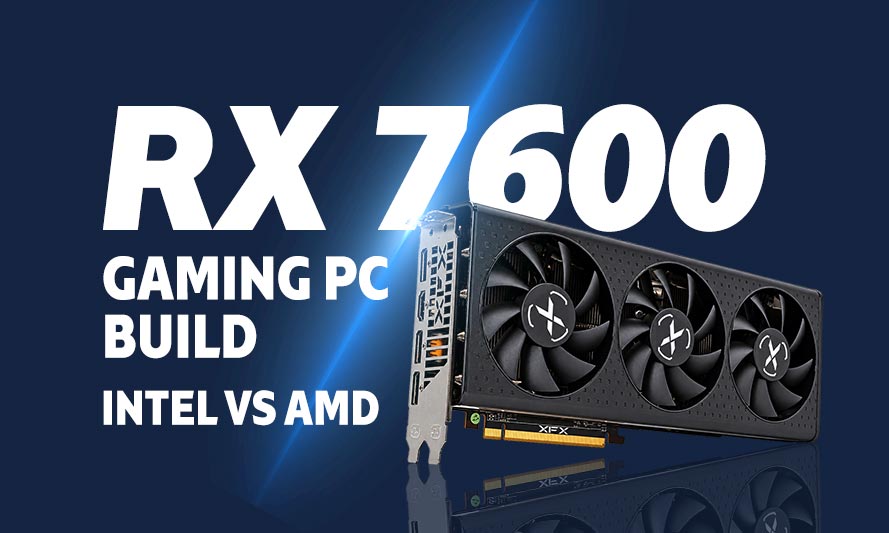
Here is something the GPU market does not advertise loudly: you do not need to spend $400 on a graphics card to have a genuinely good time at 1080p. The RX 7600 PC build has been quietly eating the budget gaming segment alive in 2026, and if you have been sleeping on it, this guide is your wake-up call. AMD’s RDNA 3 architecture packed into a sub-$300 card that handles modern titles at high settings without breaking your bank account or your sanity… that is the kind of deal that makes GPU scalpers lose sleep.
This article lays out two complete builds – one on AMD’s platform, one on Intel’s – using the RX 7600 as the centerpiece. Both builds target the same performance tier, so the comparison is clean and honest. Pick the platform that suits your budget or preference, and you will walk away with a rig that punches well above its price tag.
About the RX 7600
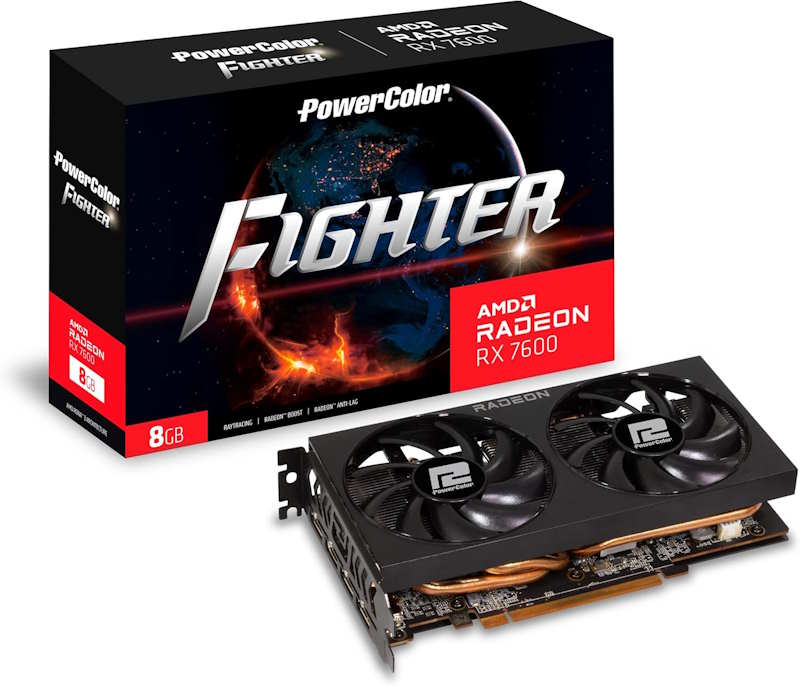
PowerColor Fighter AMD Radeon RX 7600 8GB
The PowerColor Fighter Radeon RX 7600 8GB is a strong budget gaming GPU for players who want dependable 1080p performance without spending heavily. It offers good value for mainstream gaming, handling popular titles smoothly at high settings. The Fighter edition keeps things straightforward, making it a sensible choice for affordable gaming PCs where price and practical performance matter most.
The Radeon RX 7600 launched on AMD’s RDNA 3 architecture and has held its ground as one of the most sensible 1080p graphics cards available in 2026. It carries 8GB of GDDR6 memory, which is adequate for most current titles at 1080p and a handful of 1440p scenarios if you are willing to dial back a setting or two. The card draws around 165W at full load, meaning it plays nicely with modest power supplies – a genuine advantage when you are building on a tight budget.
In terms of raw performance, the RX 7600 trades blows with NVIDIA’s RTX 4060 at a lower street price, which makes it the more rational choice for gamers who are not particularly invested in DLSS or ray tracing. AMD’s FSR 3 upscaling handles the frame generation side of things competently, and driver maturity in 2026 has ironed out most of the early quirks. Games like Cyberpunk 2077, Call of Duty, Apex Legends, and Baldur’s Gate 3 all run at comfortable framerates on high settings at 1080p. For a budget build anchor, it is hard to argue against it.
AMD PC Build with the RX 7600
The AMD platform for this build centers on Ryzen’s AM5 socket, which provides a solid upgrade path without requiring a motherboard swap down the line. Pairing the RX 7600 with a Ryzen processor on a B650 board gives you a well-rounded, future-tolerant system at a price that does not require a payment plan.
Recommended Components for the AMD RX 7600 Build
These components are hand-picked and vetted for compatibility, though we do not guarantee availability. They are suitable for an AMD-based budget gaming PC build that delivers solid 1080p gaming performance, with the RX 7600 GPU. If you do not like the recommendations, you can easily swap out unwanted parts and add new ones using the AI PC Builder tool. Simply click on the BUILD/CUSTOMIZE THIS button to get started.
- CPU: Ryzen 5 7600$215.90
Price on Newegg
Amazon Price
- Motherboard: MSI PRO B650M-A WiFi$159.99
- GPU: PowerColor Fighter AMD Radeon RX 7600 8GB (Unavailable)$246.02
- RAM: Timetec 16GB DDR5$239.99
- Storage 1: Inland TN470 SSD 1TB Gen4 NVMe$189.99
- PSU: Thermaltake Smart 650W 80+ White Certified PSU$63.99
- Case: Lian Li Lancool 205 MESH C High Airflow ATX RGB PC Case $122.99
- CPU Cooler: Thermalright Assassin X120 Refined SE CPU Air Cooler$17.90
TOTAL COST: $1,256.77
📊 Price History
[Prices updated: 4:57pm, 10/04/2026]
The Ryzen 5 7600 is a six-core workhorse that handles gaming and light productivity without complaint. Paired with PowerColor’s Fighter RX 7600 – one of the quieter and better-cooled third-party variants – this build will handle 1080p gaming at high to ultra settings across most current titles. The Teamgroup DDR4 kit keeps costs down without sacrificing stability; DDR4 on AM5 is achievable with the right board, and MSI’s B650M-A handles it effectively.
Intel PC Build with the RX 7600
Intel’s LGA1851 platform with the Core Ultra series offers a competitive alternative, particularly for users who already have Intel ecosystem familiarity or find a good deal on a Core Ultra CPU. The build below mirrors the AMD configuration in every component except the CPU and motherboard, making the platform comparison straightforward.
Recommended Components for the Intel RX 7600 Build
These components are hand-picked and vetted for compatibility, though we do not guarantee availability. They are suitable for an Intel-based budget gaming PC build that delivers solid 1080p gaming performance, with the RX 7600 GPU. If you do not like the recommendations, you can easily swap out unwanted parts and add new ones using the AI PC Builder tool. Simply click on the BUILD/CUSTOMIZE THIS button to get started.
- CPU: Core i5-13400F$234.29
- Motherboard: ASUS Prime B760M-K D4 Intel B760 LGA 1700$118.99
- GPU: PowerColor Fighter AMD Radeon RX 7600 8GB (Unavailable)$246.02
- RAM: Teamgroup T-Force Vulcan Z 16GB DDR4$129.99
- Storage 1: Inland TN470 SSD 1TB Gen4 NVMe$189.99
- PSU: Thermaltake Smart 650W 80+ White Certified PSU$63.99
- Case: Lian Li Lancool 205 MESH C High Airflow ATX RGB PC Case $122.99
- CPU Cooler: Thermalright Assassin X120 Refined SE CPU Air Cooler$17.90
TOTAL COST: $1,124.16
📊 Price History
[Prices updated: 4:57pm, 10/04/2026]
The Core i5-13400F remains a remarkably capable gaming CPU in 2026, and its pricing on the used and clearance market has made it even more attractive for budget builds. On the ASUS Prime B760M-K D4, it runs DDR4 natively without any platform gymnastics. Gaming performance between this build and the AMD variant above will be within a few frames of each other in most titles; the CPU is rarely the bottleneck when the RX 7600 is in the equation at 1080p.
Putting it Together
Both builds are straightforward to assemble, even for first-timers. The micro-ATX form factor of the Lian Li LANCOOL 205M provides enough room to work comfortably without the sprawl of a full tower. Cable management is manageable with the semi-modular Thermaltake PSU, since you only connect the cables you actually need.
Install the CPU cooler before fitting the motherboard into the case if you are working with the Thermalright Assassin X – it makes bracket access considerably easier. The RX 7600 requires a single 8-pin power connector, so there is no multi-connector PCIe cable headache to deal with. Slot the NVMe drive into the M.2 slot before installing the GPU, since the card will obstruct access on both of these boards once seated.
If this is your first time putting a system together and you want a structured walkthrough rather than guesswork, the step-by-step guide at How to DIY Build Your Own PC Step by Step covers the entire process from unboxing to first boot. It is worth a read before you pick up a screwdriver.
Optimizing Your Build for 1080p Gaming
Out of the box, the RX 7600 performs well, but a few adjustments will extract the most from it. First, enable Resizable BAR (ReBAR) in your motherboard’s BIOS; both the MSI B650M-A and the ASUS Prime B760M-K D4 support it, and it provides a measurable framerate improvement in a number of titles at no cost.
In AMD’s Adrenalin software, enable Radeon Super Resolution or FSR 3 Frame Generation in supported titles. At 1080p, FSR 3 in Quality mode is nearly indistinguishable from native rendering while adding meaningful frame headroom. For competitive shooters like Valorant or CS2, disable it entirely and let the card run native; the raw framerate at 1080p on low settings will be well above 144fps, which is where it matters.
On the RAM side, enable XMP or EXPO in the BIOS to bring the Teamgroup DDR4 kit up to its rated 3200MHz. It ships at JEDEC default (2133MHz) and leaving it there is leaving performance on the table. The difference is particularly noticeable in CPU-limited scenarios, which can occur in open-world titles with dense NPC populations.
For storage, the Inland PCIe Gen 4 NVMe drive will load game assets quickly enough that you will spend more time in loading screens waiting for matchmaking than for your drive. DirectStorage, supported on Windows 11, further reduces asset decompression overhead in titles that implement it. Make sure Windows 11 is installed on the NVMe drive rather than a secondary SATA drive if you have one; the OS benefits from fast storage as much as games do.
Thermals on both builds should be comfortable. The Thermalright Assassin X handles Ryzen 5 7600 and Core i5-13400F loads without difficulty; neither CPU is a heat monster under gaming workloads. The Lian Li LANCOOL 205M’s mesh front panel moves enough air to keep the RX 7600 in its comfort zone even during extended sessions. If you are in a warmer climate or a poorly ventilated room, adding a single 120mm exhaust fan at the rear is a cheap insurance policy.
MORE LIKE THIS>
Best Budget PC Build with Ryzen 5 5600 and RX 7600
Cost of A PC Build with RTX 5090 in 2026: Full Budget Guide
The Ultimate Gaming PC Build with RTX 5090
The Importance of a Dedicated Graphics Card for Video Editing, Photo Editing & Casual Use
What’s the Best Graphics Card for Video Editing and Rendering in 2026
Conclusion
The RX 7600 PC build is one of the more honest propositions in the 2026 budget gaming market. It does not pretend to be a 4K powerhouse, and it does not need to be. At 1080p – where the overwhelming majority of PC gamers actually play – it delivers consistent, high-setting performance across a wide library of titles without demanding a GPU that costs more than some gaming consoles.
Between the AMD and Intel configurations above, the performance gap in gaming is negligible. The AMD build offers a better upgrade path on AM5, while the Intel build may be slightly cheaper depending on current CPU and board pricing in your region. Either way, you end up with a capable, well-balanced system that will serve you comfortably through the next several years of gaming – assuming you resist the urge to upgrade the moment something shinier appears on the shelf. No promises on that front.
All Articles